• Skip to main content
  • Skip to primary sidebar

Nexa Collections

  • Home
  • Serving
    • Medical
    • Dental
    • Small Business
    • Large Business
    • Commercial Collections
    • Government
    • Utilities
    • Fitness Clubs
    • Schools
    • Senior Care Facility
  • Contact Us
    • About us
    • Cost

Debt Recovery

NextGen Ambulatory Software & Collections: Turning Reports into Cash

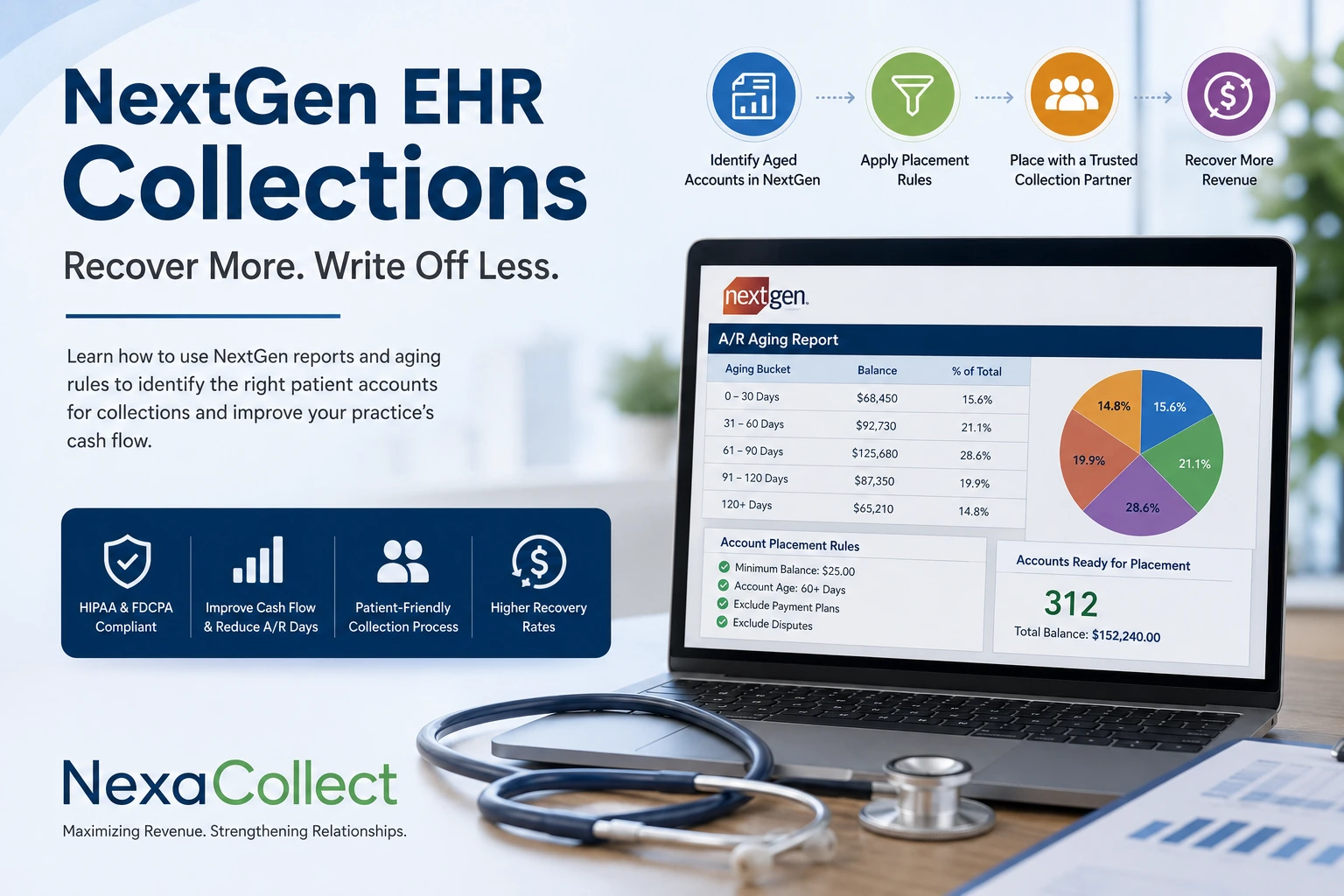
NextGen helps medical practices manage billing, claims and accounts receivable, but persistent patient balances may eventually require an outside collection agency. Practices can use NextGen aging reports to identify eligible accounts based on balance amount, age, contact attempts, payment-plan status and dispute status.

nextgen ehr collection agency

NextGen is modern. Your A/R might not be.

NextGen has grown into a major player in ambulatory EHR and practice management, with cloud-based tools for scheduling, documentation, billing, and revenue cycle management for both small practices and larger enterprise groups.

On paper, it can:

  • Streamline claims

  • Reduce days in A/R

  • Accelerate collections

NextGen even offers A/R recovery support, where a specialist team works aged accounts and some clients see several-fold returns on that investment.

Yet many practices still see:

  • Days in A/R drifting well past 40–50 days

  • A growing stack of 60–120+ day patient balances

  • No clear policy on when an account stops being “just late” and becomes bad debt

The problem usually isn’t the software. It’s the last mile of collections.


What NextGen actually does well for the money side

Before talking about collections, it helps to be clear about what NextGen already brings to the table.

For billing & RCM, NextGen can:

  • Capture charges and push cleaner claims through its integrated PM and clearinghouse

  • Use rules engines and edits to reduce denials and rework

  • Provide A/R dashboards and reports so you can see aging, payer mix, and payment lag

  • Offer RCM services teams who focus on insurance A/R, underpayments, and denials

Done well, a practice-management system like NextGen should help you keep most payments inside 30–40 days, with overall A/R days ideally under 40–50.

What it doesn’t do is chase stubborn patient balances indefinitely.


Where NextGen stops and true collections begin

NextGen is built to manage the revenue cycle:

  • Registration

  • Eligibility

  • Coding and charges

  • Claims and remits

  • Insurance follow-up

But once a self-pay or residual balance has:

  • Ignored statements, texts, and portals

  • Sat in 60–120+ day aging buckets

  • Stopped responding to your staff

…you’re no longer dealing with a billing issue. You’re in debt recovery territory.

At this stage, you need:

  • Persistent, structured follow-up over weeks and months

  • Skip-tracing when contact data is wrong

  • Negotiation skills with patients juggling multiple debts

  • A clear path to escalation or closure

That’s work for a collection agency, not an EHR.


A simple NextGen → collection agency workflow

Instead of exporting random spreadsheets whenever someone has time, you can turn your overdue A/R into a repeatable pipeline.

Your existing page already hints at a NextGen debt collection utility. Let’s frame what that looks like in a way that’s clear for readers.

You keep control over four levers:

  1. Minimum balance

    • Example: only send accounts above $100, $250, or $500, depending on your patient base and risk tolerance.

  2. Account age / last payment date

    • Only send accounts where no payment has been made in, say, 60 / 90 / 120 / 180 days.

    • This uses the “last payment” or “last activity” data already living in NextGen.

  3. What “step” they go into

    • Soft, fixed-fee letter campaigns (polite but firm, branded notices).

    • Or straight into phone-driven, contingency collections for chronically late payers.

    • Or a combination: letters first; calls later if there’s still no response.

  4. Who not to send

    • Disputed cases

    • Active payment plans

    • Certain payer classes or assistance programs

    • Any accounts you want to treat with extra care

Once those rules are locked in, the workflow is simple:

  • Run your NextGen aging / A/R reports

  • The utility picks up accounts that meet your rules

  • Approved accounts are transferred cleanly to your chosen collection partner

  • As money is recovered, payments are posted back in your system like any other payment

No re-keying. No “we’ll do this someday.”


When does a NextGen account become a collections account?

Every practice needs its own policy, but your NextGen data should drive that decision, not gut feeling.

A practical approach:

1. Watch your aging buckets

From your NextGen PM or RCM reports, track:

  • 0–30 days (normal cycle)

  • 31–60 days (reminders + phone calls)

  • 61–90 days (warning zone)

  • 91–120+ days (high risk / probable bad debt)

If a noticeable chunk of your patient A/R lives in 91+ days, those dollars are in danger.

2. Set a time rule

For example:

  • Any patient balance with:

    • No payment in 90+ days, and

    • At least 3–4 contacts (statements / reminders / calls), and

    • No active arrangement

    → Eligible for collections placement.

3. Set a dollar rule

  • Very small balances (say, under $50–$100):

    • Bundle them for periodic batch placement or write-off.

  • Mid-size balances (e.g., $150–$750):

    • Full reminder sequence, then collections at 90–120 days.

  • Big balances (e.g., $750+ or $1,000+):

    • Extra attention early; don’t let them quietly age past 60–90 days.

Once you’ve written these rules down, your NextGen reports become a placement engine, not just an FYI.


Why a NextGen-savvy collection agency matters

NextGen already gives you:

  • Detailed A/R and encounter data

  • Insurance vs patient split

  • Notes about earlier contact and billing history

A good collection agency knows how to work with that data instead of starting from scratch. That means:

  • Using your exports to prioritize high-yield accounts

  • Respecting your patient-experience expectations while still being firm

  • Staying compliant with HIPAA, FDCPA, and state collection laws

  • Reporting back with enough detail that you can reconcile easily inside NextGen

You’re not looking for “sharks.” You’re looking for a specialized extension of your revenue cycle that understands how NextGen practices operate.


Where Nexa fits in

Nexa operates as a full-service debt collection agency built to plug directly into your NextGen aging reports. We handle everything from soft-letter reminders to intensive third-party recovery—so your billing team can stay focused on active patient care.

What we do:

  • Work your NextGen aging or A/R export directly, using the balance, age, and exception rules your practice sets.
  • Contact patients directly across mail, phone, and email, inside FDCPA and HIPAA guidelines, with a tone built for specialty and long-term care relationships.
  • Handle payment plans, disputes, and negotiation so your billing staff isn’t stuck chasing chronically late accounts between patient visits.
  • Return recovered payments and account status updates so they post back into NextGen cleanly, keeping your aging reports accurate.

You’re not replacing NextGen’s billing or RCM tools. You’re adding a dedicated recovery layer for the accounts that have already aged past what in-house follow-up or NextGen’s own A/R recovery service can close — typically the 90-plus day balances still sitting on your books with no payment plan in place.

Already using NextGen Medical/EMS Software? Have unpaid medical bills? 


Need to transfer your overdue accounts receivable to a collection agency? Contact us

  • You decide what should be the minimum outstanding balance eligible for collections.
  • Only send accounts if a payment hasn’t been made in _(60/120/180) days.
  • Send 5 collection demands to your patient or transfer directly for debt collection calls.
  • You are in total control of the process. Dedicated small business debt collectors.
  • Contact us for a demo of our free NextGen debt collection utility. 

    Collection Agency
    Debt Collection Utility

FAQ

Does NextGen’s own A/R recovery service replace a collection agency?

Not entirely. NextGen’s A/R recovery support works aged accounts within the practice’s existing billing relationship, and practices using it have seen 3x-10x ROI. For balances that have gone fully unresponsive, typically 90-plus days with no contact, a dedicated collection agency picks up where that service stops.

What’s a healthy days-in-A/R number for a NextGen practice?

Most practices target 30-40 days, with overall A/R days ideally kept under 40-50. Once a noticeable share of patient balances sits in the 91-plus day bucket, those dollars become increasingly unlikely to recover through normal billing follow-up alone.

Can Nexa work directly from a NextGen aging report?

Yes. Nexa takes a NextGen aging or A/R export, filtered by whatever balance and age rules a practice sets, and works the file without requiring manual account-by-account handoff.

Does NextGen offer software for dental practices too?

Yes. NextGen Healthcare markets a dedicated Dental EHR and practice management solution alongside its ambulatory products, so dental practices on NextGen can use the same collections workflow described here.

Is Nexa’s process HIPAA compliant for NextGen-based practices?

Yes. Account handling, communication, and data transfer all follow HIPAA requirements alongside FDCPA and applicable state collection rules.

Filed Under: Debt Recovery

Eaglesoft Integration: Turn Stale Dental A/R into Collected Cash

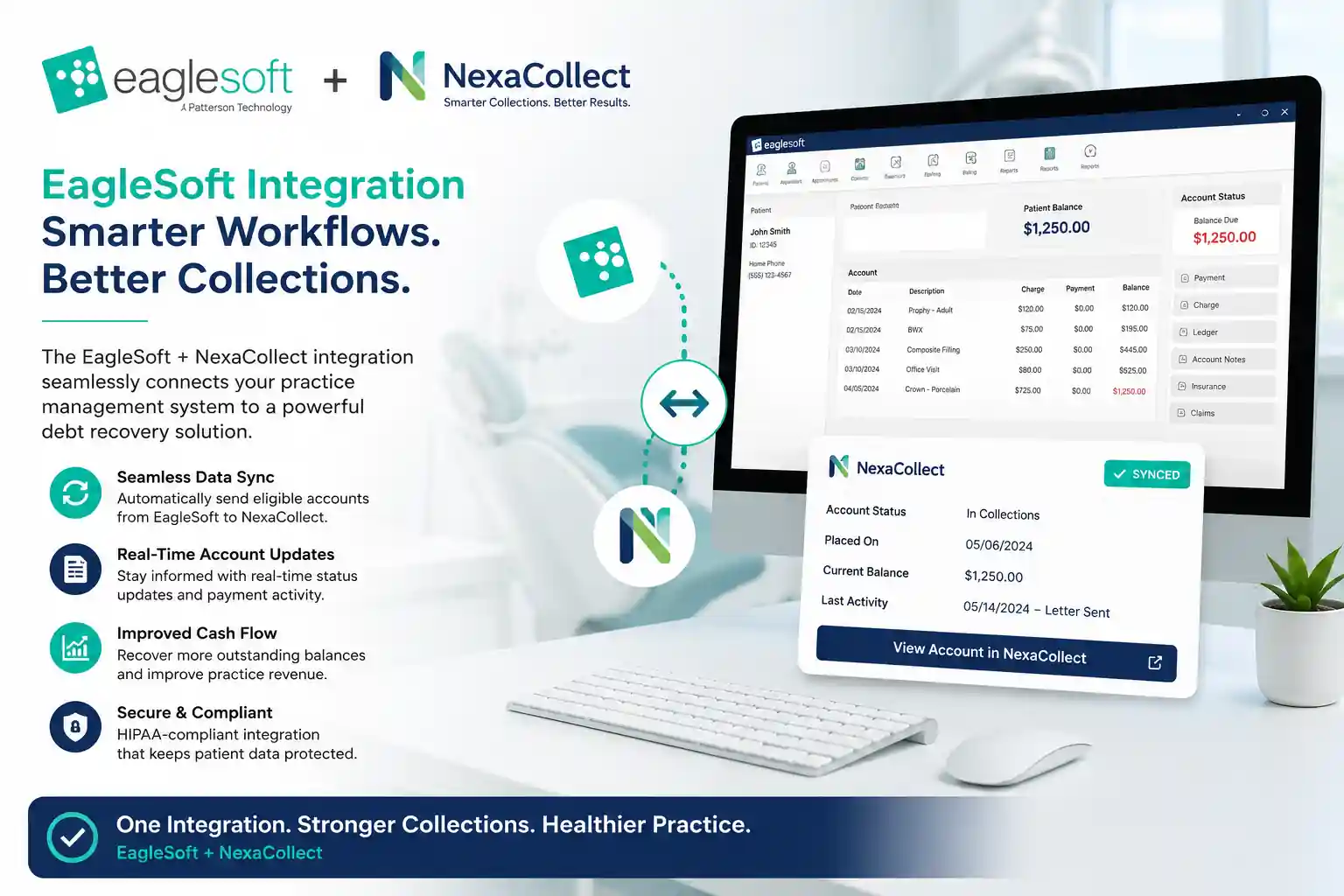
Eaglesoft integration, in the context of dental accounts receivable, means connecting the aging and A/R data your practice already tracks in Patterson Dental’s Eaglesoft system to a dedicated collections process for the patient balances that have stopped responding to statements and reminders. It isn’t a plug-in inside Eaglesoft itself streaming into another app; it’s a workflow, where an aging export feeds placement rules, like balance size, days since last payment, and existing payment plans, that decide which accounts move to a collection agency and which stay in-house. For a user base of nearly 30,000 practices, that handoff is often the missing piece between a well-run front office and a shrinking 90-day column.

Eaglesoft Dental Accounts Receivable Aging Report

Eaglesoft is popular. Old A/R is, unfortunately, even more popular.

Eaglesoft has been around for 25+ years and serves nearly 30,000 active users across the U.S. and Canada. It’s a serious platform, not a hobby product.

Yet typical dental A/R tells a different story:

  • Benchmarks often show the average dental practice with tens of thousands of dollars sitting in 90+ day A/R, and once balances cross 90 days, practices usually recover only a small fraction of that money.

  • Many offices see A/R days around 45, even though insurers often pay in roughly 30 days.

In other words: Eaglesoft can be rock-solid and you can still be leaking cash.

This page is about that gap — and how to use both Eaglesoft and a collection agency (via a small, free utility) to close it.


What “healthy” A/R actually looks like for a dental office

Before talking integrations, it helps to know what you’re aiming for.

Dental advisors commonly recommend:

  • A/R days: roughly 30–45 days. Anything consistently above that suggests slow collections or broken workflows.

  • A/R over 90 days: under 10% of total A/R (excluding long ortho contracts).

  • Net collections: around 98–100% of adjusted production.

  • A/R ratio (A/R ÷ average monthly production): ideally close to 1.0–1.5 months of production on the books, not 2–3 months.

Reality check for Eaglesoft users:

If your Eaglesoft A/R report shows A/R days >45, more than 10% of A/R in 90+ days, or an A/R ratio well above 1.5, you’re outside the comfort zone. Those aren’t “slow payers” — that’s bad debt in slow motion.


Eaglesoft does the early work. Late A/R is a different game.

Eaglesoft is built to manage your everyday operations:

  • Scheduling, charting, imaging

  • Insurance claims and e-attachments

  • Statements and online payments (via integrated partners like Vyne Trellis, DentalXChange, CarePay+, card-on-file tools, etc.)

  • A/R and production reports by provider, location, and date

That’s a powerful early-stage revenue engine.

But Eaglesoft will never:

  • Chase a non-responsive patient every week for six months

  • Dig up a new address or phone number

  • Negotiate a multi-step payment plan with someone already behind on other bills

  • Decide which accounts are worth escalating and which should be written off

That’s the line where “practice management” ends and “debt collection” begins.


Step one: find your “collection zone” inside Eaglesoft

Instead of going by gut feeling (“she’s nice, give her more time”), let your Eaglesoft reports tell you when an account has crossed the line.

Start with the A/R Aging report:

  • Look at the breakdown: 0–30, 31–60, 61–90, 91–120, 120+ days.

  • Focus on patient balances, not just insurance A/R.

Ask:

  • What percentage of my A/R is in 90+ days?

  • How much of that is patient responsibility?

  • How long has it been since any payment or meaningful contact?

Remember: once a balance hits 90+ days, your recovery odds drop sharply. Waiting another three months rarely helps.


The free Eaglesoft collection utility: a small tool with sharp teeth

To turn “we should send these to collections” into something automatic, you can use a small, free Eaglesoft debt collection utility.

You stay in control; the utility just enforces your rules.

You can typically set:

  • Minimum balance to send

    • Example: only send accounts over $100, $250, or $500.

  • Age of the account

    • Based on days since last payment or last activity — for example, 60, 90, 120 or 180 days.

  • Which recovery step to use

    • Gentle, fixed-fee letter campaigns first,

    • or direct to full contingency collections for serious delinquents.

  • Which patients to exclude

    • Ortho on long payment plans

    • Genuine hardship or charity-care cases

    • VIPs you want to handle personally

Once the criteria are saved, the utility:

  1. Reads the Eaglesoft database.

  2. Finds accounts matching your rules.

  3. Prepares a clean export for your collection partner (no retyping from screens).

You go from “someday we’ll clean this up” to “once a month, our 90+ day list is automatically prepped for collections.”


Practical placement rules (feel free to modify)

Here are sample rules a typical Eaglesoft practice might adopt:

1. Standard rule for everyday accounts

  • Balance ≥ $200

  • No payment in 90+ days

  • At least 3 statements / reminders already sent
    → Send to fixed-fee letter service or step-2 style demand program.

2. High-balance rule

  • Balance ≥ $750 or $1,000

  • No payment in 60+ days

  • Not in ortho or active payment plan
    → Move faster: short internal follow-up, then straight to contingency collections.

3. Low-balance batch rule

  • Balance $50–$200

  • No payment in 120+ days
    → Either batch these to collections once or twice a year or write off; don’t let tiny balances chew up staff time.

If you can shrink 90+ A/R from something like $100,000 down to $25–30k over time by tightening collections, that’s tens of thousands of dollars back in the bank, not abandoned on old ledgers.


How this plays with the Eaglesoft ecosystem you already use

You don’t have to choose between Eaglesoft integrations and collections. They’re different layers.

  • Claims and e-attachment partners

    • Help you send cleaner claims, get ERAs faster, and reduce payer delays.

  • Payment and text-to-pay tools

    • Make it easier for patients to pay via text, mobile, online, and card-on-file.

Those tools are about preventing A/R from aging in the first place.

The Eaglesoft collection utility + a third-party collection agency are about what to do when, despite all that, money still isn’t coming in.

Think of it as:

Eaglesoft + payment integrations = early-stage collections.
Eaglesoft + our utility + a collection agency = late-stage collections.

You need both layers for a truly healthy A/R.


Where Nexa Fits into Your Eaglesoft Workflow

Nexa operates directly as a full-service debt collection agency designed to integrate with Eaglesoft’s accounts receivable reports. We eliminate the friction of chasing delinquent patient balances while maintaining your practice’s reputation in the community.

What we do for Eaglesoft practices:

  • Direct Report Ingestion: Work directly from your Eaglesoft Account Aging Report or custom exports—no manual cherry-picking or data re-entry required.
  • Automated Collection Sequences: Contact patients via compliant mail, phone, and digital channels inside HIPAA and FDCPA guidelines, tailored specifically for dental patient relationships.
  • Full Account Resolution: Handle payment plans, settlement discussions, and balance disputes so your front desk isn’t stuck making awkward collection calls between patient check-ins.
  • Clean Ledger Reconciliation: Recovered payments and status updates flow back to your team, allowing clean posting directly into your Eaglesoft ledger.


Already using Eaglesoft Dental Software? Have unpaid medical bills? 


Need to transfer your overdue accounts receivable to a debt collection agency? Contact us

  • You decide what should be the minimum outstanding balance eligible for collections.
  • Only send accounts if a payment hasn’t been made in _(60/120/180) days.
  • Send 5 collection demands to your patient or transfer directly for debt collection calls.
  • You are in total control of the process. Dedicated small business debt collectors.
  • Contact us for a demo of our free Eaglesoft debt collection utility. 

    Collection Agency
    Debt Collection Utility

FAQ

Does Eaglesoft handle collections on old patient balances itself?

No. Eaglesoft manages scheduling, charting, claims, statements, and online payments, but it isn’t built to chase a non-responsive patient for months or negotiate payment plans with someone already behind on other bills. That’s where a dedicated collection agency takes over.

What’s a healthy A/R days number for an Eaglesoft dental practice?

Dental advisors commonly target 30-45 A/R days, with under 10% of total A/R sitting past 90 days and net collections around 98-100% of adjusted production. Once those numbers slip, cash flow typically tightens fast.

Can Nexa work directly from an Eaglesoft aging export?

Yes. Nexa takes an Eaglesoft A/R aging export, filtered by whatever balance and age rules a practice sets, and works the file without requiring manual account-by-account handoff.

Does using Eaglesoft’s payment integrations replace the need for collections?

No. Tools like Vyne Trellis, DentalXChange, and CarePay+ help prevent A/R from aging in the first place by making it easier for patients to pay early. Once a balance is already 90-plus days past due, that’s a separate, later-stage recovery problem.

Is Nexa’s process HIPAA compliant for Eaglesoft-based practices?

Yes. Account handling, communication, and data transfer all follow HIPAA requirements alongside FDCPA and applicable state collection rules.

Can Nexa collect debt directly from an Eaglesoft Aging Report export?

Yes. Nexa processes Eaglesoft Account Aging Reports directly based on your customized placement rules. You define the account age (e.g., 90+ days without payment) and minimum balance thresholds, allowing your office to transfer delinquent accounts seamlessly without manual data re-entry.

Is the Eaglesoft debt collection utility HIPAA compliant?

Yes. All account transfers, digital records, patient notices, and debt resolution communications strictly adhere to HIPAA security standards, FDCPA guidelines, and federal consumer protection regulations.

Does using Nexa replace Eaglesoft or integrated clearinghouse tools?

No. Eaglesoft and clearinghouses like Vyne Trellis or DentalXChange continue handling active insurance billing and daily practice management. Nexa steps in exclusively for delinquent patient balances that have exceeded in-house follow-up limits.


Filed Under: Debt Recovery

Using Nextech Software? Need Debt Collection Agency?

If you are a doctor or practice administrator you know that the software you use is of vital importance to the success of your practice, both in terms of patient care and its financial success.

A great practice management software will help your practice run more smoothly, get through your appointments faster, and help your medical professionals see the information they need at-a-glance.

You need to find a package that fits your changing needs, is suitable for both the medical providers and the front and back-office staff. If you are a specialist practice your software solution is even more vital. For over two decades Nextech have produced an advanced and integrated EMR and PM solution, but is it the right one for your business?

Already using Nextech Software? Have unpaid medical bills? 
Need to transfer your overdue accounts receivable to a debt collection agency? Contact us

  • You decide what should be the minimum outstanding balance eligible for collections.
  • Only send accounts if a payment hasn’t been made in _(60/120/180) days.
  • Send 5 collection demands to your patient or transfer directly for debt collection calls.
  • You are in total control of the process. Dedicated small business debt collectors.
  • Contact us for a demo of our free Nextech debt collection utility. 

    Collection Agency
    Debt Collection Utility

Who is Nextech EMR for?

Nextech’s Practice Management software is designed specifically for practices that specialize in areas like ophthalmology, plastic surgery, dermatology, orthopedics and medical spas.

What are the Benefits of Using Nextech EMR?

The key benefit of using Nextech EMR for your specialist practice is that it is highly customizable, so you can customize templates and more to fit the needs of your practice and desired workflow. Some of the other key benefits are:

  • Speedy Charting – charting is often a time-consuming process, but Nextech can be tailored instantaneously to a physician’s needs without the need to talk to a developer. These custom templates allow you to take accurate, relevant notes and do diagnosis coding via dropdown menus and filtered lists.
  • Streamlined Laboratory Communication – the time it takes to order tests and wait for results is stressful for clients and frustrating for physicians, but the software tracks the progress, reduces paperwork, and reduces the amount of time before a doctor can give a diagnosis.
  • Streamlined Scheduling – The scheduling module allows maximum efficiency whilst dealing with numerous medical providers at different locations, easy drag and drop appointment changes, and a first available appointment finder.
  • Appointment Reminder and Automatic Schedule Updates – Within the scheduler, there is an integrated secure reminder system that automatically messages patients’ cell phones and, when they text back either confirming or canceling, the scheduler automatically updates to reflect their answer.
  • Real-Time Practice Management – The room manager allows both providers and administrators to see in real-time how patients are progressing during their visits. This allows identification of problem areas so the correct choices can be made to ease the patient’s path and thus helps to improve patient care.
  • Optimized Billing – Your billing will be simplified and profitability increased by Nextech’s intuitive ICD-10 coding assisted solution which decreases denials and maximizes reimbursements. Your payment turn-around will be accelerated and the workflow of your back office optimized. There is a comprehensive claims management system that simplifies this often complex and troublesome area.
  • Cloud-Based – It is a web-based, multi-platform system where providers can study patient profiles, check appointments and view all data on their cell phones and tablets. The interface is very simple to use allowing physicians to flip through documents as if they were paper. It also enables individual charting and maximizes charting efficiency keeping all data accessible and complete.
  • Patient Portal – There is an option within the software to provide a patient portal so that patients can update their information, look at three test results and check on appointments.
  • Strong Support – One of the most important aspects of any software is its support. Nextech provides both on the phone and in-person support are ready to address your problems and find solutions. They want happy, successful customers who will be happy with their system and recommend it to other practices in their field.

What are Nextech EMR’s Features?

  • Custom Templates and Fields
  • Drag and Drop Scheduling
  • High-Powered Analytics Tools
  • Patient Portal
  • Multi-Platform
  • Cloud-Based
  • Nextech Network Easy Referrals
  • Shared Clinical Knowledge Library
  • Dictation Tools
  • E-Prescribing
  • HIPAA Compliant

Is Nextech Right For You?

The software is constantly being updated and refined to keep your practice performing at its best, and while no practice management software is faultless, Nextech is constantly fine-tuning their product to remove any bugs, improve performance and take on board customers’ feedback.

At the moment Nextech is used worldwide by 7,000 medical providers and over 50,000 support office staff. You don’t get that kind of success without providing a Practice Management system that works well, runs smoothly and allows medical providers to concentrate on helping their patients, so it’s highly likely it will be the right software for your practice.

Nextech doesn’t offer a free trial and the only way to get a quote is to contact them, so if you think Nextech is right for your practice, contact them for a demo.

Filed Under: Debt Recovery

eClinicalWorks & Medical Collections: Turning Your A/R Dashboard Into Real Cash

Using eClinicalWorks alongside a collection agency means keeping your EHR and RCM tools exactly as they are for claims, billing, and reporting, while routing a specific slice of your aging report — the patient balances that have stopped responding to statements and reminders, typically 90-plus days out — to a dedicated collections process. This isn’t a live software plug-in inside eClinicalWorks; it’s a secure export workflow, where your aging report data feeds placement rules that decide which accounts move to collections and which stay in-house. If you’re watching A/R creep past 45-60 days on eCW, the fix usually isn’t the software. It’s the missing handoff between what eClinicalWorks shows you and what happens next.

eClinicalWorks & Medical Collections: Turning Your A/R Dashboard Into Real Cash

eClinicalWorks is strong EHR software. It’s not a collections department.

eClinicalWorks has grown into one of the largest ambulatory EHR and PM platforms in the U.S. Tens of thousands of providers rely on it every day for scheduling and clinical documentation, e-prescribing, labs, and imaging, charge capture and coding, and claims, posting, and reporting.

Many practices also use eCW RCM tools and services for eligibility and deductible checks, claim scrubbing and automated edits, ERA posting and denial queues, and dashboards and KPIs.

More recently, eCW has leaned heavily into AI-powered, “agentic” RCM to reduce manual work and speed up claim cycles.

All of that is valuable. But even with great software, most practices still face A/R days drifting into the 40s and 50s, 10-20% of A/R sitting in 90+ day aging, and denial rates in double digits, especially as payer rules change.

At some point, technology alone cannot force patients or payers to pay. You need clear policies, people, and a medical collections process built for patient balances around the system.

Need a Collection Agency? Contact us


What eClinicalWorks does well for revenue — and what it doesn’t do

It helps to draw a clean line.

eCW is great at:

  • Capturing charges quickly and consistently
  • Reducing obvious coding and format errors
  • Submitting and tracking claims electronically
  • Highlighting denials and underpayments
  • Producing A/R and aging reports by payer, provider, and location

eCW does not:

  • Call overdue patients and arrange payment plans for you
  • Negotiate with stubborn self-pay accounts that are 120+ days old
  • Skip-trace bad addresses or wrong phone numbers
  • Litigate or pursue hard-to-collect balances
  • Replace a licensed, compliant, third-party collection agency for bad-debt A/R

If you treat eClinicalWorks like a “set it and forget it” collections machine, you end up with a beautiful dashboard and a growing pile of unpaid balances.

Are your eClinicalWorks numbers actually healthy?

The first step is to stop guessing and look at your eCW reports like a CFO, not just a clinician. Key metrics to pull from eCW:

  • Days in A/R (overall): Strong practices aim for roughly 30-40 days. When you’re consistently over 45-50 days, something is off.
  • A/R aging buckets: Break out patient and insurance A/R into 0-30, 31-60, 61-90, 91-120, and 120+ days. A/R over 90 days should be a small slice, not a large chunk — when more than 10-15% of total A/R lives there, it’s a red flag.
  • Insurance vs. patient responsibility: Look at how much A/R is payer balances, pure self-pay, or patient-due after insurance. With high deductibles and co-insurance, patient balances are rising, and these require a very different follow-up approach than payer A/R.
  • Denial rate and top denial reasons: eCW already shows the percentage of claims denied on first pass and common denial codes. If denials are creeping up year over year, staff spend more time firefighting, and more balances drift into aged A/R.

Once you know your numbers, the question becomes: what happens to those 60-, 90-, and 120-day balances next?

Where balances slip through in eClinicalWorks workflows

Even well-run practices see money slipping through at a few critical points:

  1. Front-office gaps: Demographics, insurance information, or eligibility checks are incomplete, and patients are not clearly told how much they will owe or when.
  2. Back-office overload: Denial queues in eCW grow faster than staff can work them, and simple, low-dollar claims get ignored in favor of complex ones.
  3. Weak patient follow-up: Statements go out, but no structured reminder schedule exists, and staff make calls “when they have time,” which is never enough.
  4. No clear escalation rule: Some practices keep accounts forever in “patient A/R” because nobody wants to “send patients to collections,” resulting in high A/R, low cash, and a lot of quiet write-offs.

eClinicalWorks shows you the problem clearly on screen. But unless you turn those insights into rules and actions, nothing changes.

Using eClinicalWorks data to decide what goes to collections

A practical approach is to define simple, written placement rules based on your eCW reports. For example:

By aging:

  • Patient balances 0-30 days: statements and soft reminders only.
  • 31-60 days: reminder letter plus text/email and a phone attempt.
  • 61-90 days: stronger reminder, offer a payment plan, final internal notice.
  • 90+ days: if no progress or arrangement, eligible for third-party collections.

By balance size:

  • Small balances (under $50-$100): one or two reminders, then internal write-off or batch placement depending on your policy.
  • Mid-range balances ($100-$500): full internal workflow, then move to collections at 90+ days.
  • Large balances ($500+ or $1,000+): earlier calls, more effort at 30-60 days — don’t let them quietly age into 6-12 months.

By payer / visit type:

  • Chronic non-paying payers or plans: tighten pre-authorization and eligibility rules, and watch balances from those plans closely.
  • Certain visit types (procedures, high-dollar imaging, elective care): stricter front-end collections such as deposits and signed estimates, with a faster escalation path if the patient balance is ignored.

You can set up most of these segments directly inside eCW using existing reports and filters. The missing piece is the policy and follow-through.

AI + humans: pairing eCW RCM with real-world collections

eClinicalWorks’ newer AI and automation features are ideal for scrubbing claims and catching coding issues, checking status with payers, pushing clean claims out faster, and flagging risky accounts before they age out.

What AI cannot do on its own: talk a scared patient through a bill they don’t understand, negotiate a realistic payment plan with someone juggling multiple debts, track down a moved patient with no forwarding address, or decide when it’s time to escalate to legal action.

That’s where professional medical collection agencies come in. The best ones understand HIPAA, FDCPA, and modern medical-debt rules, are comfortable working from eClinicalWorks exports and reports, use patient-friendly scripts and payment options, and provide feedback that helps you tweak your eCW workflows upstream.

Think of it as a layered system: eClinicalWorks and your staff prevent as much A/R and denial waste as possible, while a collection partner recovers what inevitably slips through, without abusing patients or damaging your reputation.

What a healthcare-focused collection agency should know about eClinicalWorks

If you’re on eCW, look for agencies that can speak your language. They should be ready to accept secure exports of aging reports, patient contact data, and balance details from eCW, work with your payer codes, rendering providers, and locations, respect your do-not-contact lists, charity-care policies, and state-specific rules, and report back recovery data in a format you can easily map to your eCW metrics.

Red flags: agencies that treat medical debt exactly like credit-card collections, show no understanding of the No Surprises Act, medical-debt credit reporting changes, or balance-billing limits, and have no process for protecting PHI or signing Business Associate Agreements.

You want a partner that understands both medical compliance and the reality of patient-pay balances in a high-deductible world, not just a generic call center.

How account data is handled

Every eClinicalWorks export Nexa receives is transferred through a secure, encrypted channel, never email attachments or unsecured file sharing. A signed Business Associate Agreement is in place before any protected health information is shared, consistent with HIPAA requirements. All patient contact and collection activity follows FDCPA guidelines alongside applicable state debt collection laws. This is a data-handling relationship, not a public data feed: your export stays within your account and is used only for the accounts you’ve placed.

Where Nexa fits in

To be direct about what this actually is: Nexa does not have a live, embedded software integration inside eClinicalWorks. What we offer is a secure export workflow — your practice pulls an aging or A/R report from eClinicalWorks using your own placement rules, and sends it to us through a secure, HIPAA-compliant channel. Nexa Collections is a full-service collection agency, not a referral service or an information hub. Once we receive that export, we take it from there.

What we do:

  • Work your eClinicalWorks aging or A/R export directly, using the age, balance, and exception rules your practice sets.
  • Contact patients directly across mail, phone, and email, inside FDCPA and HIPAA guidelines, using scripts built for patients already juggling multiple bills.
  • Sign a Business Associate Agreement (BAA) before any PHI changes hands, and handle every account under that agreement.
  • Handle payment plans, disputes, and negotiation so your billing staff isn’t stuck chasing 90-plus day balances between denial queues and new claims.
  • Return recovered payments and account status updates so they map back into your eClinicalWorks metrics cleanly.

You’re not replacing eClinicalWorks or its RCM and AI-powered claim tools. You’re adding a dedicated recovery layer, connected by a secure export rather than a technical integration, for the accounts that have already aged past what statements, reminders, and internal follow-up can close. This same secure-export approach applies whether your practice runs on Compulink instead, on NextGen for ambulatory or dental practices, or on Eaglesoft for dental practices — the workflow and compliance standards stay the same. For exact rates, see the full breakdown of Nexa’s fixed-fee and contingency pricing.

FAQ

Does eClinicalWorks include a built-in collection agency?

No. eClinicalWorks offers powerful billing and RCM tools, and in some cases full-service RCM, but it is still software and services, not a contingency collection agency. It will not pursue old patient debts the way a licensed collection firm does.

What A/R days should a practice on eClinicalWorks aim for?

Many practices using eCW aim for 30-40 days in A/R with a relatively small slice of A/R over 90 days. If dashboards show 45-50+ days consistently, or a large chunk of A/R sitting 90+ days, the follow-up and collections process needs work.

How do I know which eCW accounts to send to collections?

Use eClinicalWorks aging reports to define clear rules by age, balance size, and visit type. A common pattern is: once a patient balance is 90+ days old with no response, it is a strong candidate for third-party collections.

Can I still use eClinicalWorks if I outsource collections?

Yes. Most practices continue to use eCW for charge capture, billing, and reporting, while sending specific sets of aged accounts to an external agency. The data starts and ends in the EHR/PM system; the collection agency works that data in between.

Will using a collection agency upset my patients?

Handled poorly, it can. Handled well, it doesn’t have to. A good medical-focused agency uses respectful language, offers payment plans, and knows when to back off. Often patients have already ignored multiple statements and calls before an account is placed.

Is this a live, technical integration with eClinicalWorks?

No. Nexa doesn’t have an embedded plug-in or API connection inside eClinicalWorks. The workflow is a secure export: your practice pulls an aging or A/R report using your own placement rules and sends it to Nexa through an encrypted channel.

Will Nexa sign a Business Associate Agreement (BAA)?

Yes. A BAA is signed before any protected health information is shared, and every account is handled under that agreement, consistent with HIPAA requirements.

Filed Under: Debt Recovery

Using CareCloud Software? Need a Collections Agency to Recover Bills?

Using CareCloud alongside a collection agency means keeping CareCloud’s EHR, practice management, and RCM tools exactly as they are for claims, billing, and patient engagement, while routing a narrow slice of the aging report, the patient balances that have stopped responding to statements and reminders, typically 90-plus days out, to a dedicated collections process. This isn’t a live software plug-in inside CareCloud; it’s a secure export workflow, where an aging report feeds placement rules that decide which accounts move to collections and which stay in-house. CareCloud, a NASDAQ-listed platform serving tens of thousands of providers across 70-plus specialties, gives practices strong billing tools, but closing out old patient balances still takes a dedicated recovery layer on top.

CareCloud Medical A/R Collections

Why CareCloud users still struggle with A/R

CareCloud checks a lot of boxes: cloud-based EHR and practice management, integrated RCM tools or full billing services, and dashboards that show denials, collections, and A/R trends. On paper, everything looks under control.

But in real life you still see accounts that sit 60, 90, 120-plus days past due, a growing chunk of A/R tied to patient responsibility, and staff who “will follow up later” but never quite get to it.

That’s not a software bug. That’s the gap between billing and debt recovery.

Where CareCloud helps you — and where it stops

CareCloud is very good at what it is supposed to do: capturing charges and creating claims, scrubbing and submitting those claims accurately, posting payments and adjustments, generating aging and KPI reports, and sending standard statements and reminders.

What it does not do:

  • Call a patient every week for two months
  • Track down a guarantor who moved and changed numbers
  • Negotiate a realistic payment plan when a family is already behind on other bills
  • Decide which accounts should move from “late” to “collections”

If your strategy is “we’ll keep sending statements and hope something happens,” your old A/R will keep growing, no matter how polished the software is.

The “red zone”: when an invoice stops being a bill and becomes bad debt

Every practice has a point where, if you’re honest, you know: if this hasn’t been paid by now, it probably won’t be, unless someone treats it like a collections problem.

A few simple signals: age, where the balance has been sitting for three to four months with no meaningful payment; silence, where statements went out, maybe a couple of calls, and then nothing; and behavior, where the patient stopped responding, keeps cancelling, or ignores every message.

CareCloud will happily show you these accounts in your A/R Aging report. It will not make the hard decision for you. You need a line in the sand that says: after this point, this stops living in our billing workflow and moves to our collection workflow.

Turn your CareCloud A/R into a simple rulebook

Instead of debating every account, build a small rulebook that lives on top of your CareCloud data. Here’s one way to structure it:

Rule 1: Time. If a patient balance has no payment in 90+ days, and you’ve already made at least 3 contact attempts (statement, portal reminder, or phone call), it is eligible for collections.

Rule 2: Amount.

  • Very small balances (under $50-$100): either batch them once or twice a year, or make a decision to write them off.
  • Mid-sized balances ($150-$750): follow your normal reminder workflow; if still unpaid at 90-120 days, move them to collections.
  • Larger balances ($1,000+): review earlier and escalate faster if there is no payment or plan by 60-90 days.

Rule 3: Exceptions. Keep out formal payment plans that are being honored, active disputes, and approved charity-care or special-case patients.

Once this is written down, CareCloud becomes a trigger engine, not just a reporting tool.

How a CareCloud-friendly collections workflow fits in

Now you need a way to turn those rules into an actual, repeatable process. That’s where a CareCloud-friendly debt-collection utility comes in. The goal is to make the handoff from CareCloud to collection agency easy to configure, boring to run, and hard to forget.

Typical knobs you control:

  • Minimum balance: only send accounts with balances over $200 or $300.
  • Account age: only send accounts where there’s been no payment for 90 days (or 60 / 120 / 180, your choice).
  • Recovery path: start with a fixed-fee letter series, or go straight to contingency collections for the worst accounts.
  • Exclusions: remove accounts in payment plans, flagged disputes, or any category you mark as “do not place.”

Once configured, the utility reads the A/R data from CareCloud, finds accounts that match your rules, and prepares a clean, secure file for your collection partner. You’re no longer remembering to send accounts to collections. It just happens on schedule.

Three simple playbooks (you can adjust the numbers)

You don’t have to reinvent anything. Start with patterns like these and tweak them to your comfort level.

Playbook 1 — Standard patient A/R: balance ≥ $200, no payment in 90+ days, at least 3 contacts recorded. Send to a fixed-fee letter program first. If no response after that series, escalate to contingency collections.

Playbook 2 — High-balance safeguard: balance ≥ $1,000, no payment or arrangement at 60 days. Manager review plus one last internal call. If still no plan by 90 days, move to a full collections placement.

Playbook 3 — Old A/R cleanup: once a month, run a report of all patient A/R over 120 days that isn’t in a payment plan or dispute. Decide whether to place them in bulk with your collection agency, or close and write off accounts that truly have no recovery path.

Either way, you stop letting “forever balances” clutter your CareCloud reports.

How account data is handled

Every CareCloud export Nexa receives moves through a secure, encrypted channel, never email attachments or unsecured file sharing. A signed Business Associate Agreement is in place before any protected health information is shared, consistent with HIPAA requirements. All patient contact and collection activity follows FDCPA guidelines alongside applicable state debt collection laws. Your export is used only for the accounts you’ve placed, not shared or repurposed beyond that.

Where Nexa fits in

To be direct about what this actually is: Nexa does not have a live, embedded software integration inside CareCloud. What we offer is a secure export workflow — your practice pulls an aging or A/R report from CareCloud using your own placement rules, and sends it to us through a secure, HIPAA-compliant channel. Nexa Collections is a full-service collection agency, not a referral service or an information hub. Once we receive that export, we take it from there.

What we do:

  • Work your CareCloud aging or A/R export directly, using the age, balance, and exception rules your practice sets.
  • Contact patients directly across mail, phone, and email, inside FDCPA and HIPAA guidelines, using a tone built for practices that want to protect long-term patient relationships.
  • Sign a Business Associate Agreement (BAA) before any protected health information changes hands, and handle every account under that agreement.
  • Handle payment plans, disputes, and negotiation so your billing staff isn’t stuck chasing 90-plus day balances between new claims and denial follow-up.
  • Return recovered payments and account status updates so they map back into your CareCloud reporting cleanly.

You’re not replacing CareCloud or its RCM and analytics tools. You’re adding a dedicated recovery layer, connected by a secure export rather than a technical integration, for the accounts that have already aged past what statements, reminders, and internal follow-up can close. The same secure-export approach applies whether your practice runs on Compulink instead, on eClinicalWorks, or on Eaglesoft for dental practices — the workflow and compliance standards stay the same. For a closer look at how balances are worked once placed, see how Nexa’s medical collections process works for patient balances, and for exact rates, see the full breakdown of Nexa’s fixed-fee and contingency pricing.

FAQ

Won’t using a collection agency upset our patients?

It depends on who you choose and what you ask them to do. A good healthcare-focused agency works under HIPAA, follows debt collection regulations, and approaches patients with a firm but respectful tone, offering realistic payment options instead of ultimatums. Most patients placed have already ignored multiple statements and calls first.

Does CareCloud include a built-in collection agency?

No. CareCloud’s RCM and billing tools capture charges, submit claims, post payments, and generate aging reports, but they aren’t built to chase a non-responsive patient for months or negotiate payment plans. That’s a separate function a dedicated collection agency handles.

What’s a healthy A/R days number for a CareCloud practice?

Most practices target 30-40 days in A/R, with anything consistently over 45-50 days signaling a follow-up problem. Keeping under 10% of total A/R in the 90-plus day bucket is a reasonable benchmark.

Can Nexa work directly from a CareCloud aging export?

Yes. Nexa takes a CareCloud A/R aging export, filtered by whatever balance and age rules a practice sets, and works the file without requiring manual account-by-account handoff.

Is this a live, technical integration with CareCloud?

No. Nexa doesn’t have an embedded plug-in or API connection inside CareCloud. The workflow is a secure export: your practice pulls an aging or A/R report using your own placement rules and sends it to Nexa through an encrypted channel.

Will Nexa sign a Business Associate Agreement (BAA)?

Yes. A BAA is signed before any protected health information is shared, and every account is handled under that agreement, consistent with HIPAA requirements.

Does sending accounts to Nexa mean I’m replacing CareCloud or its RCM services?

No. CareCloud continues handling claims, billing, and patient records as usual. Nexa only takes over specific accounts a practice has already decided are past the point of in-house recovery, typically 90-plus days with no payment.

Is Nexa’s process HIPAA compliant for CareCloud-based practices?

Yes. Account handling, communication, and data transfer all follow HIPAA requirements alongside FDCPA and applicable state collection rules.

Filed Under: Debt Recovery

QuickBooks Online & Collections: What To Do When Customers Still Don’t Pay

Using QuickBooks Online alongside a collection agency means keeping QBO’s invoicing, reminders, and payment tools exactly as they are for day-to-day billing, while routing a narrow slice of your A/R Aging report, the invoices that have outlasted every reminder and late fee, typically 60-90+ days past due, to a dedicated collections process. This isn’t a live software plug-in inside QuickBooks; it’s a secure export workflow, where your A/R Aging data feeds placement rules that decide which invoices move to collections and which stay in QBO’s own follow-up cycle. According to the 2026 Intuit QuickBooks Small Business Late Payments Report, 59% of small businesses are currently owed money on unpaid invoices, averaging roughly $17,700 per business, so the gap this fills is a common one, not a sign anything is being done wrong.

QuickBooks Online accounts receivable aging report ready for collections placement

What QuickBooks Online gets right about A/R

QuickBooks Online genuinely gives you a solid starting toolkit for collections, if you turn it on and use it consistently.

Invoice and A/R basics: create clean invoices quickly, track who owes what and for how long, and run an A/R Aging Summary or Detail report by customer, date range, and balance.

Built-in early collections tools: automatic reminders that schedule polite nudges before and after due dates, automatic late fees applied to overdue invoices based on your own rules, “Pay Now” buttons that let customers pay online by card or bank transfer, and recurring invoices with autopay for retainers and subscriptions.

If you’re only sending an invoice and hoping for the best, you’re using a fraction of what QuickBooks can actually do for collections.

Setting up QuickBooks Online for collections

Think of this as a one-time setup that keeps working in the background.

1. Turn on automated invoice reminders. Stop relying on remembering to follow up manually. Set up two to three reminders around the due date, for example seven days before, on the due date, and seven to ten days after. Configure it once and QuickBooks keeps nudging on its own.

2. Enable online payments on every invoice you reasonably can. If a customer has to find a checkbook, print the invoice, and drive to the bank, momentum is already lost. A “Pay Now” button that takes 30 seconds removes most of that friction.

3. Decide where late fees make sense, and apply them consistently. Not every client needs one, but for chronic late-payers, an automatic late fee signals you’re serious about due dates and offsets some of the extra hassle.

4. Make A/R aging review a weekly habit, not a quarterly surprise. Run the A/R Aging Summary every week, filter for 61-90 and 90-plus days, and flag those as risk accounts. These are the balances quietly turning into bad debt.

When a QuickBooks invoice becomes a collections problem

At some point, reminders, late fees, and payment links stop working. That’s the line in the sand. Common rules small businesses use:

  • Time-based rule: if an invoice is 60-90 days past due and the customer isn’t responding or keeps breaking promises, it’s a collection candidate.
  • Amount-based rule: very small balances, under $50-$100, typically get one or two reminders before being batched to an agency or written off; larger balances get a phone call and one last email before escalating sooner.
  • Behavior-based rule: bounced checks, “the check is in the mail” for months, or total silence after multiple reminders are signs that more software nudges won’t change the outcome.

Once an account crosses these thresholds, it stops being a normal QuickBooks invoice and becomes a recovery project.

What a collection agency does that QuickBooks never will

QuickBooks is excellent at tracking and nudging. Collection agencies exist for the accounts that ignore all of that. A good agency can call, email, and text over a sustained period with a consistent strategy, negotiate payment plans and settlements, use skip-tracing to find customers who’ve moved, escalate a minority of cases toward legal remedies when appropriate, and work directly from your QuickBooks exports rather than starting from scratch.

QuickBooks tells you who owes you money. A collection agency focuses on how to actually get it back. Most businesses eventually need both.

How your QuickBooks data and payments are handled

Every QuickBooks Online export Nexa receives moves through a secure, encrypted channel, not email attachments or unsecured file sharing. Collection activity on consumer-type debts follows FDCPA guidelines alongside applicable state collection laws; commercial, business-to-business invoices are handled under standard contract and commercial collection practice, since the FDCPA governs consumer debt specifically. If your QuickBooks Online account happens to belong to a healthcare-adjacent practice, HIPAA protections and a signed Business Associate Agreement apply automatically to any patient-related balances, the same as on Nexa’s medical-software integration pages. Either way, your export is used only for the accounts you’ve placed.

Where Nexa fits in

To be direct about what this actually is: Nexa does not have a live, embedded software integration inside QuickBooks Online. What we offer is a secure export workflow — you pull an A/R Aging report from QBO using your own placement rules, and send it to us through a secure channel. Nexa Collections is a full-service collection agency, not a referral service or an information hub. Once we receive that export, we take it from there.

What we do:

  • Work your QuickBooks Online A/R Aging export directly, using the age, balance, and exception rules you set.
  • Contact customers directly across mail, phone, and email, inside applicable collection guidelines, without damaging relationships you may want to keep.
  • Handle payment plans, disputes, and negotiation so you’re not the one making the awkward calls.
  • Return recovered payments and account status updates so they map back into your QuickBooks records cleanly.

Pricing is straightforward, and you choose the model per account:

  • Fixed-Fee Recovery ($15/account): ideal for early-stage receivables. Debtors pay 100% directly to you, with no commission taken out.
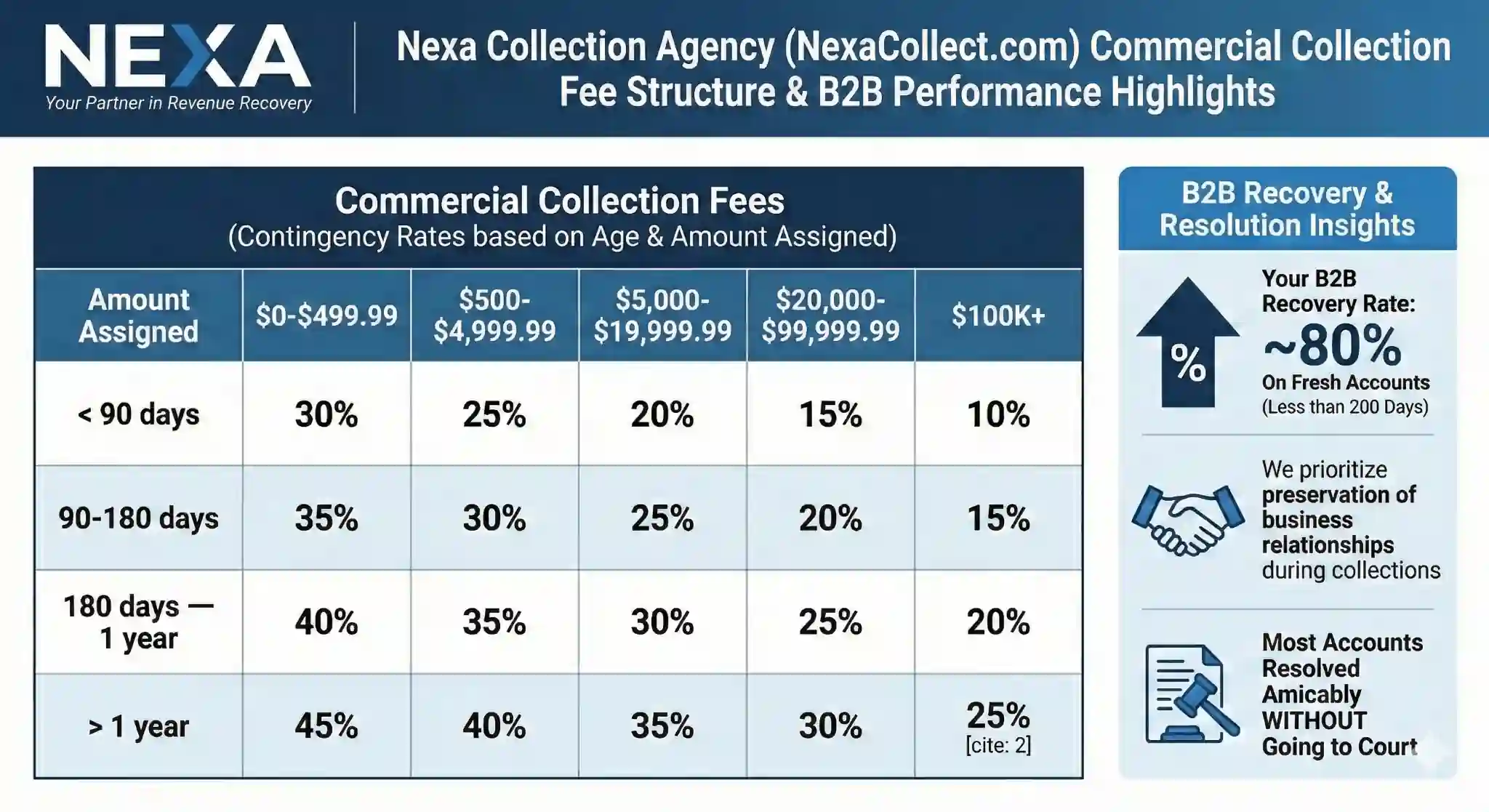
  • Contingency Service (20%-40%): performance-based recovery for older or harder accounts. No recovery, no fee.

You’re not replacing QuickBooks Online. You’re adding a dedicated recovery layer, connected by a secure export rather than a technical integration, for the invoices that have already aged past what reminders and late fees can fix. This same approach applies to how Nexa’s commercial collections process works for B2B invoices, whether that’s a single client who keeps not paying or larger business-to-business receivables. For exact rates on every tier, see the full breakdown of Nexa’s fixed-fee and contingency pricing.

FAQ

Does QuickBooks Online include a built-in collection agency?

No. QBO’s reminders, late fees, and “Pay Now” links are effective for nudging customers who intend to pay eventually, but they aren’t built to negotiate with someone who has stopped responding entirely. That’s a separate function a collection agency handles.

At what point should an unpaid QuickBooks invoice go to collections?

A common rule is 60-90 days past due with no response after reminders, late fees, and at least one direct contact attempt. Smaller balances are often batched or written off; larger balances typically warrant earlier escalation, around 30-60 days.

Is this a live, technical integration with QuickBooks Online?

No. Nexa doesn’t have an embedded plug-in or API connection inside QuickBooks. The workflow is a secure export: you pull an A/R Aging report using your own placement rules and send it to Nexa through an encrypted channel.

Can Nexa work directly from a QuickBooks Online A/R Aging export?

Yes. Nexa takes a QBO A/R Aging export, filtered by whatever balance and age rules you set, and works the file without requiring manual account-by-account handoff.

Does the FDCPA apply to unpaid QuickBooks invoices?

It depends on the debt. The FDCPA governs collection of consumer debt, personal, family, or household. Business-to-business invoices, common among QuickBooks users, are handled under commercial collection practice instead, though many of the same secure-handling standards still apply.

What’s the difference between the fixed-fee and contingency pricing options?

Fixed-Fee Recovery, at $15 per account, suits early-stage receivables; debtors pay 100% directly to you with no commission. Contingency Service, at 20-40%, is performance-based for older or harder accounts, with no recovery meaning no fee.

Does sending an invoice to Nexa mean I’m replacing QuickBooks Online?

No. QuickBooks Online continues handling invoicing, reminders, and payments as usual. Nexa only takes over specific invoices you’ve already decided are past the point of in-house follow-up.

Will using a collection agency damage customer relationships I want to keep?

Handled poorly, it can. A collection partner that’s blunt about payment plans and reasonable in tone, rather than aggressive, tends to preserve more of the relationship than months of ignored reminders do. Most accounts placed have already gone unresponsive to multiple direct attempts.

Is my QuickBooks data handled securely if I use Nexa?

Yes. Exports move through a secure, encrypted channel rather than email attachments, and data is used only for the accounts placed. If your business is healthcare-adjacent, HIPAA protections and a Business Associate Agreement apply automatically to any patient-related balances.

Filed Under: Debt Recovery

  • « Go to Previous Page
  • Page 1
  • Interim pages omitted …
  • Page 29
  • Page 30
  • Page 31
  • Page 32
  • Page 33
  • Interim pages omitted …
  • Page 55
  • Go to Next Page »

Primary Sidebar


accounts receivable

Need a Collection Agency?
Kindly fill this form.
We’ll get in touch with you

    Please prove you are human by selecting the cup.

    Compliance & Security

    • SOC 2 Type II Certified: Third-party audited data security and strict privacy controls.

    • HIPAA Compliant: Secure, legal processing of medical and municipal EMS accounts.

    • PCI-DSS Level 1: Highest tier of data encryption for secure payment processing.

    • FDCPA & FCRA Aligned: Full legal adherence to federal consumer protection laws.

    Recent Posts

    • Collection Agency for Large Balances: High-Value B2B Debt Recovery
    • Baltimore Collection Agency | Medical, Commercial, Schools & More
    • Commercial and B2B Collection Agency in Detroit
    • Boston Medical Collection Agency | Serving Hospitals, Physicians & Dentists
    • Collection Agency in El Paso, TX | Compliant, Cost Effective & Reputation Safe
    • Collection Agency in Washington DC | Medical, Schools, Businesses & Contractors
    • The Collection Agency School Districts Trust With Their Reputation
    • How Dental Insurance Denials Turn Into Patient Debt (And How to Stop It)

    Featured Posts

    • Best Practices for Cultivating a Culture of Accountability
    • Collection Agency for Boat Repair and Rental Services
    • Media & Publishing Debt Recovery: Recovering Revenue, Protecting the Brand

    Copyright © 2026 NEXACOLLECT.COM | This content is provided for general informational purposes only and should not be considered legal advice. Collection laws and requirements may vary by state, account type, documentation, debtor status, and specific facts. Please consult qualified legal counsel for guidance regarding your particular situation. Nexa and its authorized collection partners service accounts in accordance with applicable federal and state collection requirements. Visit our home page to know more about us.

    X
    Need a Collection Agency?
    Contact Us