• Skip to main content
  • Skip to primary sidebar

Nexa Collections

  • Home
  • Serving
    • Medical
    • Dental
    • Small Business
    • Large Business
    • Commercial Collections
    • Government
    • Utilities
    • Fitness Clubs
    • Schools
    • Senior Care Facility
  • Contact Us
    • About us
    • Cost

Debt Recovery

Using Nextech Software? Need Debt Collection Agency?

If you are a doctor or practice administrator you know that the software you use is of vital importance to the success of your practice, both in terms of patient care and its financial success.

A great practice management software will help your practice run more smoothly, get through your appointments faster, and help your medical professionals see the information they need at-a-glance.

You need to find a package that fits your changing needs, is suitable for both the medical providers and the front and back-office staff. If you are a specialist practice your software solution is even more vital. For over two decades Nextech have produced an advanced and integrated EMR and PM solution, but is it the right one for your business?

Already using Nextech Software? Have unpaid medical bills? 
Need to transfer your overdue accounts receivable to a debt collection agency? Contact us

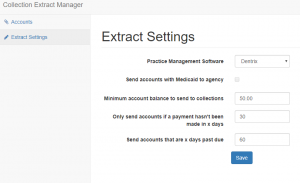
  • You decide what should be the minimum outstanding balance eligible for collections.
  • Only send accounts if a payment hasn’t been made in _(60/120/180) days.
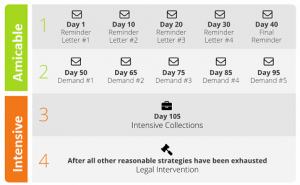
  • Send 5 collection demands to your patient or transfer directly for debt collection calls.
  • You are in total control of the process. Dedicated small business debt collectors.
  • Contact us for a demo of our free Nextech debt collection utility. 

    Collection Agency
    Debt Collection Utility

Who is Nextech EMR for?

Nextech’s Practice Management software is designed specifically for practices that specialize in areas like ophthalmology, plastic surgery, dermatology, orthopedics and medical spas.

What are the Benefits of Using Nextech EMR?

The key benefit of using Nextech EMR for your specialist practice is that it is highly customizable, so you can customize templates and more to fit the needs of your practice and desired workflow. Some of the other key benefits are:

  • Speedy Charting – charting is often a time-consuming process, but Nextech can be tailored instantaneously to a physician’s needs without the need to talk to a developer. These custom templates allow you to take accurate, relevant notes and do diagnosis coding via dropdown menus and filtered lists.
  • Streamlined Laboratory Communication – the time it takes to order tests and wait for results is stressful for clients and frustrating for physicians, but the software tracks the progress, reduces paperwork, and reduces the amount of time before a doctor can give a diagnosis.
  • Streamlined Scheduling – The scheduling module allows maximum efficiency whilst dealing with numerous medical providers at different locations, easy drag and drop appointment changes, and a first available appointment finder.
  • Appointment Reminder and Automatic Schedule Updates – Within the scheduler, there is an integrated secure reminder system that automatically messages patients’ cell phones and, when they text back either confirming or canceling, the scheduler automatically updates to reflect their answer.
  • Real-Time Practice Management – The room manager allows both providers and administrators to see in real-time how patients are progressing during their visits. This allows identification of problem areas so the correct choices can be made to ease the patient’s path and thus helps to improve patient care.
  • Optimized Billing – Your billing will be simplified and profitability increased by Nextech’s intuitive ICD-10 coding assisted solution which decreases denials and maximizes reimbursements. Your payment turn-around will be accelerated and the workflow of your back office optimized. There is a comprehensive claims management system that simplifies this often complex and troublesome area.
  • Cloud-Based – It is a web-based, multi-platform system where providers can study patient profiles, check appointments and view all data on their cell phones and tablets. The interface is very simple to use allowing physicians to flip through documents as if they were paper. It also enables individual charting and maximizes charting efficiency keeping all data accessible and complete.
  • Patient Portal – There is an option within the software to provide a patient portal so that patients can update their information, look at three test results and check on appointments.
  • Strong Support – One of the most important aspects of any software is its support. Nextech provides both on the phone and in-person support are ready to address your problems and find solutions. They want happy, successful customers who will be happy with their system and recommend it to other practices in their field.

What are Nextech EMR’s Features?

  • Custom Templates and Fields
  • Drag and Drop Scheduling
  • High-Powered Analytics Tools
  • Patient Portal
  • Multi-Platform
  • Cloud-Based
  • Nextech Network Easy Referrals
  • Shared Clinical Knowledge Library
  • Dictation Tools
  • E-Prescribing
  • HIPAA Compliant

Is Nextech Right For You?

The software is constantly being updated and refined to keep your practice performing at its best, and while no practice management software is faultless, Nextech is constantly fine-tuning their product to remove any bugs, improve performance and take on board customers’ feedback.

At the moment Nextech is used worldwide by 7,000 medical providers and over 50,000 support office staff. You don’t get that kind of success without providing a Practice Management system that works well, runs smoothly and allows medical providers to concentrate on helping their patients, so it’s highly likely it will be the right software for your practice.

Nextech doesn’t offer a free trial and the only way to get a quote is to contact them, so if you think Nextech is right for your practice, contact them for a demo.
Filed Under: Debt Recovery

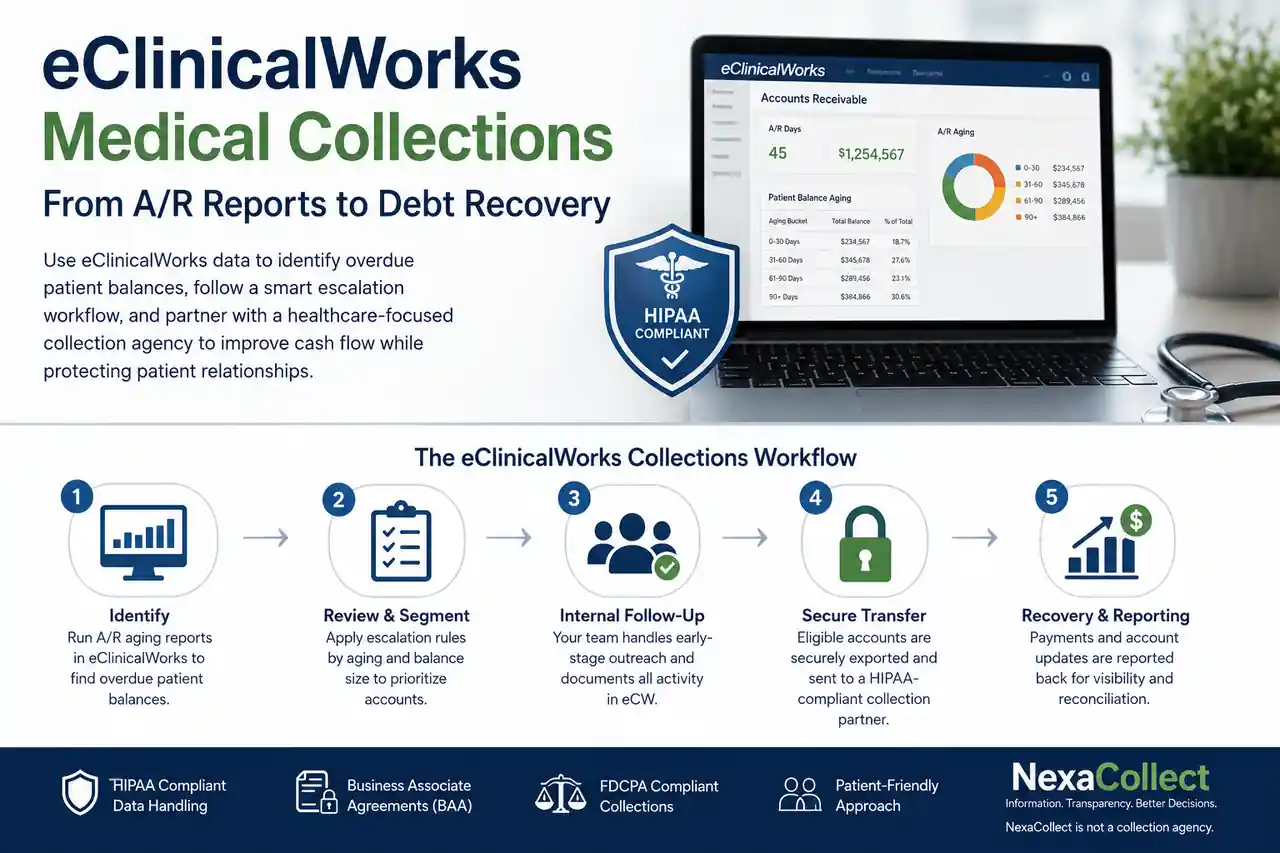
eClinicalWorks & Medical Collections: Turning Your A/R Dashboard Into Real Cash

Using eClinicalWorks alongside a collection agency means keeping your EHR and RCM tools exactly as they are for claims, billing, and reporting, while routing a specific slice of your aging report — the patient balances that have stopped responding to statements and reminders, typically 90-plus days out — to a dedicated collections process. This isn’t a live software plug-in inside eClinicalWorks; it’s a secure export workflow, where your aging report data feeds placement rules that decide which accounts move to collections and which stay in-house. If you’re watching A/R creep past 45-60 days on eCW, the fix usually isn’t the software. It’s the missing handoff between what eClinicalWorks shows you and what happens next.

eClinicalWorks & Medical Collections: Turning Your A/R Dashboard Into Real Cash

eClinicalWorks is strong EHR software. It’s not a collections department.

eClinicalWorks has grown into one of the largest ambulatory EHR and PM platforms in the U.S. Tens of thousands of providers rely on it every day for scheduling and clinical documentation, e-prescribing, labs, and imaging, charge capture and coding, and claims, posting, and reporting.

Many practices also use eCW RCM tools and services for eligibility and deductible checks, claim scrubbing and automated edits, ERA posting and denial queues, and dashboards and KPIs.

More recently, eCW has leaned heavily into AI-powered, “agentic” RCM to reduce manual work and speed up claim cycles.

All of that is valuable. But even with great software, most practices still face A/R days drifting into the 40s and 50s, 10-20% of A/R sitting in 90+ day aging, and denial rates in double digits, especially as payer rules change.

At some point, technology alone cannot force patients or payers to pay. You need clear policies, people, and a medical collections process built for patient balances around the system.

Need a Collection Agency? Contact us


What eClinicalWorks does well for revenue — and what it doesn’t do

It helps to draw a clean line.

eCW is great at:

  • Capturing charges quickly and consistently
  • Reducing obvious coding and format errors
  • Submitting and tracking claims electronically
  • Highlighting denials and underpayments
  • Producing A/R and aging reports by payer, provider, and location

eCW does not:

  • Call overdue patients and arrange payment plans for you
  • Negotiate with stubborn self-pay accounts that are 120+ days old
  • Skip-trace bad addresses or wrong phone numbers
  • Litigate or pursue hard-to-collect balances
  • Replace a licensed, compliant, third-party collection agency for bad-debt A/R

If you treat eClinicalWorks like a “set it and forget it” collections machine, you end up with a beautiful dashboard and a growing pile of unpaid balances.

Are your eClinicalWorks numbers actually healthy?

The first step is to stop guessing and look at your eCW reports like a CFO, not just a clinician. Key metrics to pull from eCW:

  • Days in A/R (overall): Strong practices aim for roughly 30-40 days. When you’re consistently over 45-50 days, something is off.
  • A/R aging buckets: Break out patient and insurance A/R into 0-30, 31-60, 61-90, 91-120, and 120+ days. A/R over 90 days should be a small slice, not a large chunk — when more than 10-15% of total A/R lives there, it’s a red flag.
  • Insurance vs. patient responsibility: Look at how much A/R is payer balances, pure self-pay, or patient-due after insurance. With high deductibles and co-insurance, patient balances are rising, and these require a very different follow-up approach than payer A/R.
  • Denial rate and top denial reasons: eCW already shows the percentage of claims denied on first pass and common denial codes. If denials are creeping up year over year, staff spend more time firefighting, and more balances drift into aged A/R.

Once you know your numbers, the question becomes: what happens to those 60-, 90-, and 120-day balances next?

Where balances slip through in eClinicalWorks workflows

Even well-run practices see money slipping through at a few critical points:

  1. Front-office gaps: Demographics, insurance information, or eligibility checks are incomplete, and patients are not clearly told how much they will owe or when.
  2. Back-office overload: Denial queues in eCW grow faster than staff can work them, and simple, low-dollar claims get ignored in favor of complex ones.
  3. Weak patient follow-up: Statements go out, but no structured reminder schedule exists, and staff make calls “when they have time,” which is never enough.
  4. No clear escalation rule: Some practices keep accounts forever in “patient A/R” because nobody wants to “send patients to collections,” resulting in high A/R, low cash, and a lot of quiet write-offs.

eClinicalWorks shows you the problem clearly on screen. But unless you turn those insights into rules and actions, nothing changes.

Using eClinicalWorks data to decide what goes to collections

A practical approach is to define simple, written placement rules based on your eCW reports. For example:

By aging:

  • Patient balances 0-30 days: statements and soft reminders only.
  • 31-60 days: reminder letter plus text/email and a phone attempt.
  • 61-90 days: stronger reminder, offer a payment plan, final internal notice.
  • 90+ days: if no progress or arrangement, eligible for third-party collections.

By balance size:

  • Small balances (under $50-$100): one or two reminders, then internal write-off or batch placement depending on your policy.
  • Mid-range balances ($100-$500): full internal workflow, then move to collections at 90+ days.
  • Large balances ($500+ or $1,000+): earlier calls, more effort at 30-60 days — don’t let them quietly age into 6-12 months.

By payer / visit type:

  • Chronic non-paying payers or plans: tighten pre-authorization and eligibility rules, and watch balances from those plans closely.
  • Certain visit types (procedures, high-dollar imaging, elective care): stricter front-end collections such as deposits and signed estimates, with a faster escalation path if the patient balance is ignored.

You can set up most of these segments directly inside eCW using existing reports and filters. The missing piece is the policy and follow-through.

AI + humans: pairing eCW RCM with real-world collections

eClinicalWorks’ newer AI and automation features are ideal for scrubbing claims and catching coding issues, checking status with payers, pushing clean claims out faster, and flagging risky accounts before they age out.

What AI cannot do on its own: talk a scared patient through a bill they don’t understand, negotiate a realistic payment plan with someone juggling multiple debts, track down a moved patient with no forwarding address, or decide when it’s time to escalate to legal action.

That’s where professional medical collection agencies come in. The best ones understand HIPAA, FDCPA, and modern medical-debt rules, are comfortable working from eClinicalWorks exports and reports, use patient-friendly scripts and payment options, and provide feedback that helps you tweak your eCW workflows upstream.

Think of it as a layered system: eClinicalWorks and your staff prevent as much A/R and denial waste as possible, while a collection partner recovers what inevitably slips through, without abusing patients or damaging your reputation.

What a healthcare-focused collection agency should know about eClinicalWorks

If you’re on eCW, look for agencies that can speak your language. They should be ready to accept secure exports of aging reports, patient contact data, and balance details from eCW, work with your payer codes, rendering providers, and locations, respect your do-not-contact lists, charity-care policies, and state-specific rules, and report back recovery data in a format you can easily map to your eCW metrics.

Red flags: agencies that treat medical debt exactly like credit-card collections, show no understanding of the No Surprises Act, medical-debt credit reporting changes, or balance-billing limits, and have no process for protecting PHI or signing Business Associate Agreements.

You want a partner that understands both medical compliance and the reality of patient-pay balances in a high-deductible world, not just a generic call center.

How account data is handled

Every eClinicalWorks export Nexa receives is transferred through a secure, encrypted channel, never email attachments or unsecured file sharing. A signed Business Associate Agreement is in place before any protected health information is shared, consistent with HIPAA requirements. All patient contact and collection activity follows FDCPA guidelines alongside applicable state debt collection laws. This is a data-handling relationship, not a public data feed: your export stays within your account and is used only for the accounts you’ve placed.

Where Nexa fits in

To be direct about what this actually is: Nexa does not have a live, embedded software integration inside eClinicalWorks. What we offer is a secure export workflow — your practice pulls an aging or A/R report from eClinicalWorks using your own placement rules, and sends it to us through a secure, HIPAA-compliant channel. Nexa Collections is a full-service collection agency, not a referral service or an information hub. Once we receive that export, we take it from there.

What we do:

  • Work your eClinicalWorks aging or A/R export directly, using the age, balance, and exception rules your practice sets.
  • Contact patients directly across mail, phone, and email, inside FDCPA and HIPAA guidelines, using scripts built for patients already juggling multiple bills.
  • Sign a Business Associate Agreement (BAA) before any PHI changes hands, and handle every account under that agreement.
  • Handle payment plans, disputes, and negotiation so your billing staff isn’t stuck chasing 90-plus day balances between denial queues and new claims.
  • Return recovered payments and account status updates so they map back into your eClinicalWorks metrics cleanly.

You’re not replacing eClinicalWorks or its RCM and AI-powered claim tools. You’re adding a dedicated recovery layer, connected by a secure export rather than a technical integration, for the accounts that have already aged past what statements, reminders, and internal follow-up can close. This same secure-export approach applies whether your practice runs on Compulink instead, on NextGen for ambulatory or dental practices, or on Eaglesoft for dental practices — the workflow and compliance standards stay the same. For exact rates, see the full breakdown of Nexa’s fixed-fee and contingency pricing.

FAQ

Does eClinicalWorks include a built-in collection agency?

No. eClinicalWorks offers powerful billing and RCM tools, and in some cases full-service RCM, but it is still software and services, not a contingency collection agency. It will not pursue old patient debts the way a licensed collection firm does.

What A/R days should a practice on eClinicalWorks aim for?

Many practices using eCW aim for 30-40 days in A/R with a relatively small slice of A/R over 90 days. If dashboards show 45-50+ days consistently, or a large chunk of A/R sitting 90+ days, the follow-up and collections process needs work.

How do I know which eCW accounts to send to collections?

Use eClinicalWorks aging reports to define clear rules by age, balance size, and visit type. A common pattern is: once a patient balance is 90+ days old with no response, it is a strong candidate for third-party collections.

Can I still use eClinicalWorks if I outsource collections?

Yes. Most practices continue to use eCW for charge capture, billing, and reporting, while sending specific sets of aged accounts to an external agency. The data starts and ends in the EHR/PM system; the collection agency works that data in between.

Will using a collection agency upset my patients?

Handled poorly, it can. Handled well, it doesn’t have to. A good medical-focused agency uses respectful language, offers payment plans, and knows when to back off. Often patients have already ignored multiple statements and calls before an account is placed.

Is this a live, technical integration with eClinicalWorks?

No. Nexa doesn’t have an embedded plug-in or API connection inside eClinicalWorks. The workflow is a secure export: your practice pulls an aging or A/R report using your own placement rules and sends it to Nexa through an encrypted channel.

Will Nexa sign a Business Associate Agreement (BAA)?

Yes. A BAA is signed before any protected health information is shared, and every account is handled under that agreement, consistent with HIPAA requirements.

Filed Under: Debt Recovery

Using CareCloud Software? Need a Collections Agency to Recover Bills?

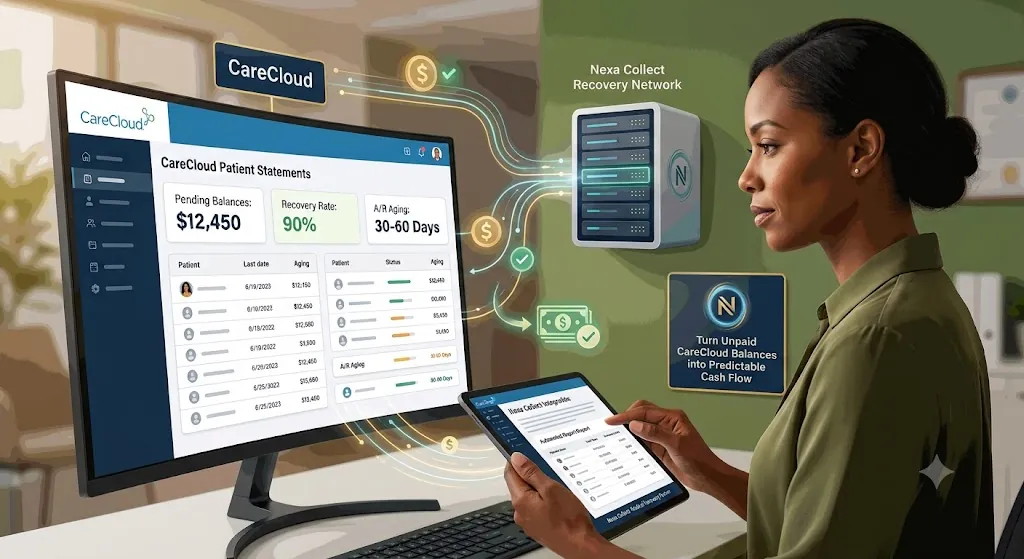
Using CareCloud alongside a collection agency means keeping CareCloud’s EHR, practice management, and RCM tools exactly as they are for claims, billing, and patient engagement, while routing a narrow slice of the aging report, the patient balances that have stopped responding to statements and reminders, typically 90-plus days out, to a dedicated collections process. This isn’t a live software plug-in inside CareCloud; it’s a secure export workflow, where an aging report feeds placement rules that decide which accounts move to collections and which stay in-house. CareCloud, a NASDAQ-listed platform serving tens of thousands of providers across 70-plus specialties, gives practices strong billing tools, but closing out old patient balances still takes a dedicated recovery layer on top.

CareCloud Medical A/R Collections

Why CareCloud users still struggle with A/R

CareCloud checks a lot of boxes: cloud-based EHR and practice management, integrated RCM tools or full billing services, and dashboards that show denials, collections, and A/R trends. On paper, everything looks under control.

But in real life you still see accounts that sit 60, 90, 120-plus days past due, a growing chunk of A/R tied to patient responsibility, and staff who “will follow up later” but never quite get to it.

That’s not a software bug. That’s the gap between billing and debt recovery.

Where CareCloud helps you — and where it stops

CareCloud is very good at what it is supposed to do: capturing charges and creating claims, scrubbing and submitting those claims accurately, posting payments and adjustments, generating aging and KPI reports, and sending standard statements and reminders.

What it does not do:

  • Call a patient every week for two months
  • Track down a guarantor who moved and changed numbers
  • Negotiate a realistic payment plan when a family is already behind on other bills
  • Decide which accounts should move from “late” to “collections”

If your strategy is “we’ll keep sending statements and hope something happens,” your old A/R will keep growing, no matter how polished the software is.

The “red zone”: when an invoice stops being a bill and becomes bad debt

Every practice has a point where, if you’re honest, you know: if this hasn’t been paid by now, it probably won’t be, unless someone treats it like a collections problem.

A few simple signals: age, where the balance has been sitting for three to four months with no meaningful payment; silence, where statements went out, maybe a couple of calls, and then nothing; and behavior, where the patient stopped responding, keeps cancelling, or ignores every message.

CareCloud will happily show you these accounts in your A/R Aging report. It will not make the hard decision for you. You need a line in the sand that says: after this point, this stops living in our billing workflow and moves to our collection workflow.

Turn your CareCloud A/R into a simple rulebook

Instead of debating every account, build a small rulebook that lives on top of your CareCloud data. Here’s one way to structure it:

Rule 1: Time. If a patient balance has no payment in 90+ days, and you’ve already made at least 3 contact attempts (statement, portal reminder, or phone call), it is eligible for collections.

Rule 2: Amount.

  • Very small balances (under $50-$100): either batch them once or twice a year, or make a decision to write them off.
  • Mid-sized balances ($150-$750): follow your normal reminder workflow; if still unpaid at 90-120 days, move them to collections.
  • Larger balances ($1,000+): review earlier and escalate faster if there is no payment or plan by 60-90 days.

Rule 3: Exceptions. Keep out formal payment plans that are being honored, active disputes, and approved charity-care or special-case patients.

Once this is written down, CareCloud becomes a trigger engine, not just a reporting tool.

How a CareCloud-friendly collections workflow fits in

Now you need a way to turn those rules into an actual, repeatable process. That’s where a CareCloud-friendly debt-collection utility comes in. The goal is to make the handoff from CareCloud to collection agency easy to configure, boring to run, and hard to forget.

Typical knobs you control:

  • Minimum balance: only send accounts with balances over $200 or $300.
  • Account age: only send accounts where there’s been no payment for 90 days (or 60 / 120 / 180, your choice).
  • Recovery path: start with a fixed-fee letter series, or go straight to contingency collections for the worst accounts.
  • Exclusions: remove accounts in payment plans, flagged disputes, or any category you mark as “do not place.”

Once configured, the utility reads the A/R data from CareCloud, finds accounts that match your rules, and prepares a clean, secure file for your collection partner. You’re no longer remembering to send accounts to collections. It just happens on schedule.

Three simple playbooks (you can adjust the numbers)

You don’t have to reinvent anything. Start with patterns like these and tweak them to your comfort level.

Playbook 1 — Standard patient A/R: balance ≥ $200, no payment in 90+ days, at least 3 contacts recorded. Send to a fixed-fee letter program first. If no response after that series, escalate to contingency collections.

Playbook 2 — High-balance safeguard: balance ≥ $1,000, no payment or arrangement at 60 days. Manager review plus one last internal call. If still no plan by 90 days, move to a full collections placement.

Playbook 3 — Old A/R cleanup: once a month, run a report of all patient A/R over 120 days that isn’t in a payment plan or dispute. Decide whether to place them in bulk with your collection agency, or close and write off accounts that truly have no recovery path.

Either way, you stop letting “forever balances” clutter your CareCloud reports.

How account data is handled

Every CareCloud export Nexa receives moves through a secure, encrypted channel, never email attachments or unsecured file sharing. A signed Business Associate Agreement is in place before any protected health information is shared, consistent with HIPAA requirements. All patient contact and collection activity follows FDCPA guidelines alongside applicable state debt collection laws. Your export is used only for the accounts you’ve placed, not shared or repurposed beyond that.

Where Nexa fits in

To be direct about what this actually is: Nexa does not have a live, embedded software integration inside CareCloud. What we offer is a secure export workflow — your practice pulls an aging or A/R report from CareCloud using your own placement rules, and sends it to us through a secure, HIPAA-compliant channel. Nexa Collections is a full-service collection agency, not a referral service or an information hub. Once we receive that export, we take it from there.

What we do:

  • Work your CareCloud aging or A/R export directly, using the age, balance, and exception rules your practice sets.
  • Contact patients directly across mail, phone, and email, inside FDCPA and HIPAA guidelines, using a tone built for practices that want to protect long-term patient relationships.
  • Sign a Business Associate Agreement (BAA) before any protected health information changes hands, and handle every account under that agreement.
  • Handle payment plans, disputes, and negotiation so your billing staff isn’t stuck chasing 90-plus day balances between new claims and denial follow-up.
  • Return recovered payments and account status updates so they map back into your CareCloud reporting cleanly.

You’re not replacing CareCloud or its RCM and analytics tools. You’re adding a dedicated recovery layer, connected by a secure export rather than a technical integration, for the accounts that have already aged past what statements, reminders, and internal follow-up can close. The same secure-export approach applies whether your practice runs on Compulink instead, on eClinicalWorks, or on Eaglesoft for dental practices — the workflow and compliance standards stay the same. For a closer look at how balances are worked once placed, see how Nexa’s medical collections process works for patient balances, and for exact rates, see the full breakdown of Nexa’s fixed-fee and contingency pricing.

FAQ

Won’t using a collection agency upset our patients?

It depends on who you choose and what you ask them to do. A good healthcare-focused agency works under HIPAA, follows debt collection regulations, and approaches patients with a firm but respectful tone, offering realistic payment options instead of ultimatums. Most patients placed have already ignored multiple statements and calls first.

Does CareCloud include a built-in collection agency?

No. CareCloud’s RCM and billing tools capture charges, submit claims, post payments, and generate aging reports, but they aren’t built to chase a non-responsive patient for months or negotiate payment plans. That’s a separate function a dedicated collection agency handles.

What’s a healthy A/R days number for a CareCloud practice?

Most practices target 30-40 days in A/R, with anything consistently over 45-50 days signaling a follow-up problem. Keeping under 10% of total A/R in the 90-plus day bucket is a reasonable benchmark.

Can Nexa work directly from a CareCloud aging export?

Yes. Nexa takes a CareCloud A/R aging export, filtered by whatever balance and age rules a practice sets, and works the file without requiring manual account-by-account handoff.

Is this a live, technical integration with CareCloud?

No. Nexa doesn’t have an embedded plug-in or API connection inside CareCloud. The workflow is a secure export: your practice pulls an aging or A/R report using your own placement rules and sends it to Nexa through an encrypted channel.

Will Nexa sign a Business Associate Agreement (BAA)?

Yes. A BAA is signed before any protected health information is shared, and every account is handled under that agreement, consistent with HIPAA requirements.

Does sending accounts to Nexa mean I’m replacing CareCloud or its RCM services?

No. CareCloud continues handling claims, billing, and patient records as usual. Nexa only takes over specific accounts a practice has already decided are past the point of in-house recovery, typically 90-plus days with no payment.

Is Nexa’s process HIPAA compliant for CareCloud-based practices?

Yes. Account handling, communication, and data transfer all follow HIPAA requirements alongside FDCPA and applicable state collection rules.

Filed Under: Debt Recovery

QuickBooks Online & Collections: What To Do When Customers Still Don’t Pay

Using QuickBooks Online alongside a collection agency means keeping QBO’s invoicing, reminders, and payment tools exactly as they are for day-to-day billing, while routing a narrow slice of your A/R Aging report, the invoices that have outlasted every reminder and late fee, typically 60-90+ days past due, to a dedicated collections process. This isn’t a live software plug-in inside QuickBooks; it’s a secure export workflow, where your A/R Aging data feeds placement rules that decide which invoices move to collections and which stay in QBO’s own follow-up cycle. According to the 2026 Intuit QuickBooks Small Business Late Payments Report, 59% of small businesses are currently owed money on unpaid invoices, averaging roughly $17,700 per business, so the gap this fills is a common one, not a sign anything is being done wrong.

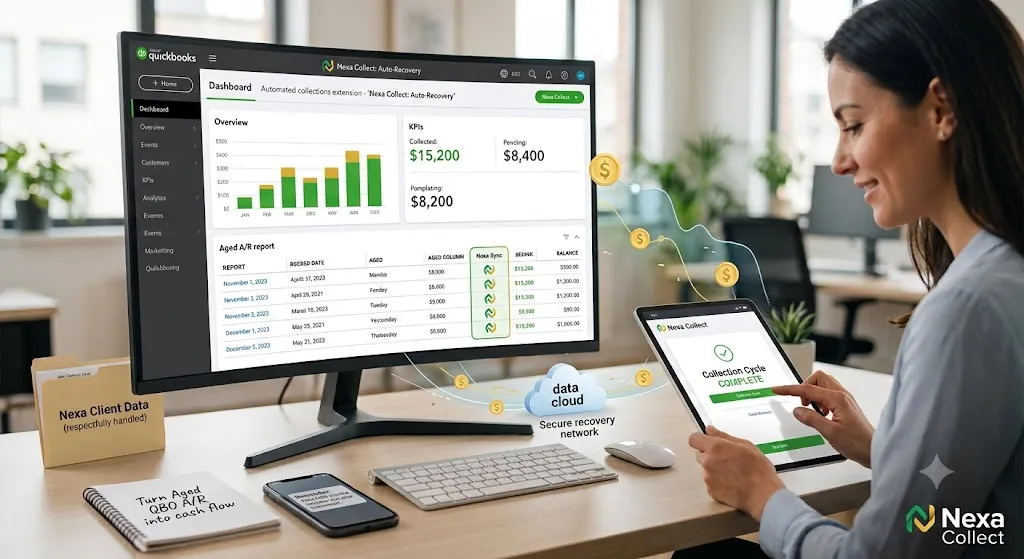
QuickBooks Online accounts receivable aging report ready for collections placement

What QuickBooks Online gets right about A/R

QuickBooks Online genuinely gives you a solid starting toolkit for collections, if you turn it on and use it consistently.

Invoice and A/R basics: create clean invoices quickly, track who owes what and for how long, and run an A/R Aging Summary or Detail report by customer, date range, and balance.

Built-in early collections tools: automatic reminders that schedule polite nudges before and after due dates, automatic late fees applied to overdue invoices based on your own rules, “Pay Now” buttons that let customers pay online by card or bank transfer, and recurring invoices with autopay for retainers and subscriptions.

If you’re only sending an invoice and hoping for the best, you’re using a fraction of what QuickBooks can actually do for collections.

Setting up QuickBooks Online for collections

Think of this as a one-time setup that keeps working in the background.

1. Turn on automated invoice reminders. Stop relying on remembering to follow up manually. Set up two to three reminders around the due date, for example seven days before, on the due date, and seven to ten days after. Configure it once and QuickBooks keeps nudging on its own.

2. Enable online payments on every invoice you reasonably can. If a customer has to find a checkbook, print the invoice, and drive to the bank, momentum is already lost. A “Pay Now” button that takes 30 seconds removes most of that friction.

3. Decide where late fees make sense, and apply them consistently. Not every client needs one, but for chronic late-payers, an automatic late fee signals you’re serious about due dates and offsets some of the extra hassle.

4. Make A/R aging review a weekly habit, not a quarterly surprise. Run the A/R Aging Summary every week, filter for 61-90 and 90-plus days, and flag those as risk accounts. These are the balances quietly turning into bad debt.

When a QuickBooks invoice becomes a collections problem

At some point, reminders, late fees, and payment links stop working. That’s the line in the sand. Common rules small businesses use:

  • Time-based rule: if an invoice is 60-90 days past due and the customer isn’t responding or keeps breaking promises, it’s a collection candidate.
  • Amount-based rule: very small balances, under $50-$100, typically get one or two reminders before being batched to an agency or written off; larger balances get a phone call and one last email before escalating sooner.
  • Behavior-based rule: bounced checks, “the check is in the mail” for months, or total silence after multiple reminders are signs that more software nudges won’t change the outcome.

Once an account crosses these thresholds, it stops being a normal QuickBooks invoice and becomes a recovery project.

What a collection agency does that QuickBooks never will

QuickBooks is excellent at tracking and nudging. Collection agencies exist for the accounts that ignore all of that. A good agency can call, email, and text over a sustained period with a consistent strategy, negotiate payment plans and settlements, use skip-tracing to find customers who’ve moved, escalate a minority of cases toward legal remedies when appropriate, and work directly from your QuickBooks exports rather than starting from scratch.

QuickBooks tells you who owes you money. A collection agency focuses on how to actually get it back. Most businesses eventually need both.

How your QuickBooks data and payments are handled

Every QuickBooks Online export Nexa receives moves through a secure, encrypted channel, not email attachments or unsecured file sharing. Collection activity on consumer-type debts follows FDCPA guidelines alongside applicable state collection laws; commercial, business-to-business invoices are handled under standard contract and commercial collection practice, since the FDCPA governs consumer debt specifically. If your QuickBooks Online account happens to belong to a healthcare-adjacent practice, HIPAA protections and a signed Business Associate Agreement apply automatically to any patient-related balances, the same as on Nexa’s medical-software integration pages. Either way, your export is used only for the accounts you’ve placed.

Where Nexa fits in

To be direct about what this actually is: Nexa does not have a live, embedded software integration inside QuickBooks Online. What we offer is a secure export workflow — you pull an A/R Aging report from QBO using your own placement rules, and send it to us through a secure channel. Nexa Collections is a full-service collection agency, not a referral service or an information hub. Once we receive that export, we take it from there.

What we do:

  • Work your QuickBooks Online A/R Aging export directly, using the age, balance, and exception rules you set.
  • Contact customers directly across mail, phone, and email, inside applicable collection guidelines, without damaging relationships you may want to keep.
  • Handle payment plans, disputes, and negotiation so you’re not the one making the awkward calls.
  • Return recovered payments and account status updates so they map back into your QuickBooks records cleanly.

Pricing is straightforward, and you choose the model per account:

  • Fixed-Fee Recovery ($15/account): ideal for early-stage receivables. Debtors pay 100% directly to you, with no commission taken out.
  • Contingency Service (20%-40%): performance-based recovery for older or harder accounts. No recovery, no fee.

You’re not replacing QuickBooks Online. You’re adding a dedicated recovery layer, connected by a secure export rather than a technical integration, for the invoices that have already aged past what reminders and late fees can fix. This same approach applies to how Nexa’s commercial collections process works for B2B invoices, whether that’s a single client who keeps not paying or larger business-to-business receivables. For exact rates on every tier, see the full breakdown of Nexa’s fixed-fee and contingency pricing.

FAQ

Does QuickBooks Online include a built-in collection agency?

No. QBO’s reminders, late fees, and “Pay Now” links are effective for nudging customers who intend to pay eventually, but they aren’t built to negotiate with someone who has stopped responding entirely. That’s a separate function a collection agency handles.

At what point should an unpaid QuickBooks invoice go to collections?

A common rule is 60-90 days past due with no response after reminders, late fees, and at least one direct contact attempt. Smaller balances are often batched or written off; larger balances typically warrant earlier escalation, around 30-60 days.

Is this a live, technical integration with QuickBooks Online?

No. Nexa doesn’t have an embedded plug-in or API connection inside QuickBooks. The workflow is a secure export: you pull an A/R Aging report using your own placement rules and send it to Nexa through an encrypted channel.

Can Nexa work directly from a QuickBooks Online A/R Aging export?

Yes. Nexa takes a QBO A/R Aging export, filtered by whatever balance and age rules you set, and works the file without requiring manual account-by-account handoff.

Does the FDCPA apply to unpaid QuickBooks invoices?

It depends on the debt. The FDCPA governs collection of consumer debt, personal, family, or household. Business-to-business invoices, common among QuickBooks users, are handled under commercial collection practice instead, though many of the same secure-handling standards still apply.

What’s the difference between the fixed-fee and contingency pricing options?

Fixed-Fee Recovery, at $15 per account, suits early-stage receivables; debtors pay 100% directly to you with no commission. Contingency Service, at 20-40%, is performance-based for older or harder accounts, with no recovery meaning no fee.

Does sending an invoice to Nexa mean I’m replacing QuickBooks Online?

No. QuickBooks Online continues handling invoicing, reminders, and payments as usual. Nexa only takes over specific invoices you’ve already decided are past the point of in-house follow-up.

Will using a collection agency damage customer relationships I want to keep?

Handled poorly, it can. A collection partner that’s blunt about payment plans and reasonable in tone, rather than aggressive, tends to preserve more of the relationship than months of ignored reminders do. Most accounts placed have already gone unresponsive to multiple direct attempts.

Is my QuickBooks data handled securely if I use Nexa?

Yes. Exports move through a secure, encrypted channel rather than email attachments, and data is used only for the accounts placed. If your business is healthcare-adjacent, HIPAA protections and a Business Associate Agreement apply automatically to any patient-related balances.

Filed Under: Debt Recovery

Dentrix Features That Actually Improve Collections

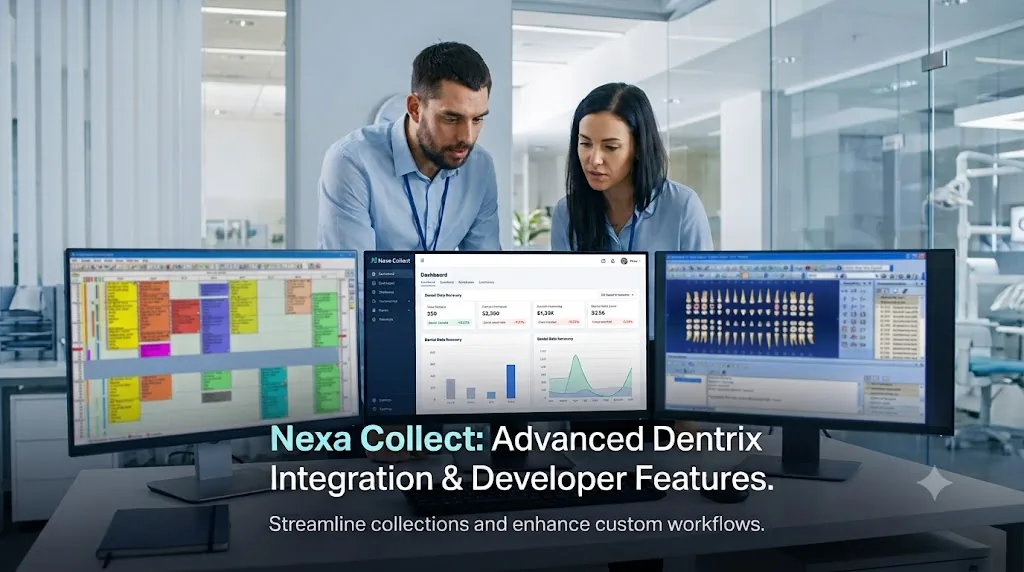
Using Dentrix alongside a collection agency means keeping Dentrix or Dentrix Ascend exactly as they are for scheduling, charting, claims, and patient billing, while routing a narrow slice of the aging report, the patient balances that have stopped responding to statements and reminders, typically 90-plus days out, to a dedicated collections process. This isn’t a live software plug-in inside Dentrix; it’s a secure export workflow, where an aging report feeds placement rules that decide which accounts move to collections and which stay in-house. Dentrix has led dental practice management for more than 35 years and is used by over 35,000 practices, but even the best software can’t make a non-responsive patient pay. That still takes a dedicated recovery process on top of it.

QuickBooks Online accounts receivable aging report ready for collections placement

Dentrix is powerful — but it’s not your collections department

Dentrix has been around for over 35 years and is used by more than 35,000 dental practices. It connects scheduling, charts, imaging, billing, and analytics into one ecosystem.

That scale is impressive, but it doesn’t guarantee low A/R days, consistently high collection ratios, or minimal write-offs on old patient balances. Dentrix gives you tools. How you use them, and what you do when accounts age out, is what really determines your cash flow.

Need a Collection Agency? Contact us


The Dentrix features that matter most for getting paid

Instead of thinking about every menu, focus on the features that directly affect A/R and collections.

Insurance eligibility and estimates. Accurate eligibility checks and chairside estimates reduce surprises. When patients know their likely out-of-pocket cost, you collect more up front and see fewer “I’ll pay later” promises.

Electronic claims and attachments. Cleaner claims and faster submissions mean fewer denials and less money sitting in insurance A/R. Use Dentrix to send claims daily, not in sporadic batches.

Patient billing, statements, and online payments. Automated statements, email and text reminders, and easy payment links are where Dentrix earns its keep. If you’re still relying on one paper statement a month, you’re under-using the platform.

A/R and aging reports. Dentrix can show you exactly where money is stuck, by aging bucket, provider, and insurance versus patient. These reports should drive decisions, not just be printed and filed.

Analytics and KPIs. Dashboards and reports help you track trends: A/R days, collection ratio, and percentage of receivables in the 90-plus day bucket. If nobody is reviewing these numbers monthly, you’re flying blind.

What your Dentrix A/R should look like

You don’t need perfect numbers; you need clear targets. Use your Dentrix reports to monitor:

  • Days in A/R: solid practices aim for about 30-45 days. If you’re routinely above 45-50 days, it’s a warning sign.
  • A/R aging distribution: 0-30 days should hold the majority of your receivables. When more than 20-25% of your A/R is in the 90-plus day bucket, you’re heading into bad-debt territory.
  • Collections versus production: many healthy practices collect around 98% of net production over time. If you’re consistently well below that, Dentrix is showing you a problem that needs action.

A simple test: open your Dentrix A/R report. If you wouldn’t be comfortable showing those numbers to a banker or buyer, your collections process needs tightening, even if Dentrix is fully installed.

Using Dentrix to decide what goes to a collection agency

Dentrix gives you the data to build simple, written rules for escalation. For example:

By aging: 0-30 days gets normal statements and soft reminders; 31-60 days gets an extra reminder plus one phone call; 61-90 days gets a firm reminder, a payment plan offer, and a final internal notice; 90-plus days, with no arrangement, is eligible for third-party collections.

By balance size: small balances, under $50-$100, get limited internal follow-up before write-off or batch placement. Medium balances, $100-$500, follow the full internal sequence before moving to collections at 90-plus days. Large balances, $500-plus, get extra attention at 30-60 days, since they shouldn’t be allowed to quietly age out.

By patient type: chronic late-payers get faster escalation, while VIP or long-term families get more conversation before placement, but still a clear limit.

The important part: make these rules explicit, use Dentrix to identify accounts that fit them, and follow the process every month.

Dentrix is your engine. A collection agency is the safety net.

Dentrix and Dentrix Ascend can help you prevent and reduce A/R through fewer claim errors, better estimates, stronger patient communication, and clear, timely reporting.

But Dentrix will not call seriously delinquent patients over and over, negotiate with someone juggling multiple debts, track down moved patients, or file lawsuits and handle legal escalation. Once a balance is 90-120-plus days old and unresponsive, you’re outside the normal office workflow. That’s where a dental-savvy collection agency comes in, working from Dentrix exports, using compliant scripts, and focusing on realistic payment solutions.

How your Dentrix data is handled

Every Dentrix or Dentrix Ascend export Nexa receives moves through a secure, encrypted channel, never email attachments or unsecured file sharing. A signed Business Associate Agreement is in place before any protected health information is shared, consistent with HIPAA requirements. All patient contact and collection activity follows FDCPA guidelines alongside applicable state debt collection laws. Your export is used only for the accounts you’ve placed, not shared or repurposed beyond that.

Where Nexa fits in

To be direct about what this actually is: Nexa does not have a live, embedded software integration inside Dentrix. What we offer is a secure export workflow — your practice pulls an aging or A/R report from Dentrix using your own placement rules, and sends it to us through a secure, HIPAA-compliant channel. Nexa Collections is a full-service collection agency, not a referral service or an information hub. Once we receive that export, we take it from there.

What we do:

  • Work your Dentrix aging or A/R export directly, using the age, balance, and exception rules your practice sets.
  • Contact patients directly across mail, phone, and email, inside FDCPA and HIPAA guidelines, using a tone built for practices that want to protect long-term patient relationships.
  • Sign a Business Associate Agreement (BAA) before any protected health information changes hands, and handle every account under that agreement.
  • Handle payment plans, disputes, and negotiation so your front-desk team isn’t stuck chasing 90-plus day balances between patients.
  • Return recovered payments and account status updates so they post back into Dentrix cleanly.

Pricing is straightforward, and you choose the model per account:

  • Fixed-Fee Recovery ($15/account): ideal for early-stage receivables. Patients pay 100% directly to you, with no commission taken out.
  • Contingency Service (20%-40%): performance-based recovery for older or harder accounts. No recovery, no fee.

You’re not replacing Dentrix. You’re adding a dedicated recovery layer, connected by a secure export rather than a technical integration, for the balances that have already aged past what statements, reminders, and internal follow-up can close. This same approach applies whether your practice runs on Eaglesoft instead or on Compulink. For more on dental-specific collection strategies and how Nexa’s medical collections process works for patient balances, or for exact rates, see the full breakdown of Nexa’s fixed-fee and contingency pricing.

FAQ

Does Dentrix include a built-in collection agency?

No. Dentrix provides billing and A/R tools, but it is not a contingency collection agency. It won’t chase old debts or pursue legal remedies on your behalf.

What’s a good A/R benchmark for a Dentrix office?

Many practices aim for 30-45 days in A/R, with less than 20-25% of receivables in the 90+ day bucket and a collection ratio near 98% of net production.

How do I use Dentrix with a collection agency?

Typically, your team exports aging reports and account details from Dentrix and securely transmits them to a collection agency. The agency works the accounts, then reports back recoveries that your staff posts in Dentrix.

Is this a live, technical integration with Dentrix?

No. Nexa doesn’t have an embedded plug-in or API connection inside Dentrix. The workflow is a secure export: your practice pulls an aging or A/R report using your own placement rules and sends it to Nexa through an encrypted channel.

Will Nexa sign a Business Associate Agreement (BAA)?

Yes. A BAA is signed before any protected health information is shared, and every account is handled under that agreement, consistent with HIPAA requirements.

What’s the difference between the fixed-fee and contingency pricing options?

Fixed-Fee Recovery, at $15 per account, suits early-stage receivables; patients pay 100% directly to you with no commission. Contingency Service, at 20-40%, is performance-based for older or harder accounts, with no recovery meaning no fee.

Does sending accounts to Nexa mean I’m replacing Dentrix?

No. Dentrix continues handling scheduling, charting, claims, and billing as usual. Nexa only takes over specific accounts a practice has already decided are past the point of in-house recovery, typically 90-plus days with no payment.

Will using a collection agency upset our patients?

Handled poorly, it can. A good dental-focused agency uses respectful language, offers payment plans, and knows when to back off. Most patients placed have already ignored multiple statements and calls.

Is Nexa’s process HIPAA compliant for Dentrix-based practices?

Yes. Account handling, communication, and data transfer all follow HIPAA requirements alongside FDCPA and applicable state collection rules.

Filed Under: Debt Recovery

Enterprise Collection Agency for Large Business: B2B & B2C Recovery

An enterprise collection agency provides outsourced accounts receivable recovery for mid-size and large corporations managing high-volume or high-value debt portfolios across both business clients (B2B) and individual consumers (B2C).

Unlike small business collection, enterprise recovery requires ERP system integration, portfolio segmentation by risk tier, multi-jurisdiction compliance architecture (FDCPA, TCPA, HIPAA, CCPA), and dedicated account management for relationship-critical debtors. The right enterprise collection partner functions as a seamless extension of your internal AR team — reducing DSO, cutting staff overhead, and protecting your corporate brand simultaneously.

Enterprise collection agency managing large-scale B2B and B2C debt recovery portfolios for corporations and mid-size businesses

Nexa acts as a surgical extension of your A/R department. We understand that while a B2B client requires a “white-glove mediation” to save a million-dollar contract, a B2C portfolio requires an automated, high-velocity system that resolves thousands of small balances without triggering a single regulatory red flag.

Nexa provides 100% reputation-safe, equipped with all 50-state collections license, offering free credit reporting, free litigious debtor check, free bankruptcy scrub, and zero onboarding fees. Secure – SOC 2 Type II & HIPAA compliant. Over 2,000 online reviews rate us 4.85 out of 5. 

Need a Collection Agency? Contact us


Enterprise AR Benchmarks: B2B vs B2C at Scale

Understanding how commercial and consumer debt performs at enterprise volume is the first step in building an effective outsourced recovery strategy:

Metric B2B (Commercial) B2C (Consumer)
Average invoice / balance value $6,420 (global average) $132 (consumer average)
Typical overdue rate 10.5% of total AR 15–22% depending on sector
Industry average DSO 45–65 days (varies by sector) 30–45 days (varies by sector)
DSO improvement with outsourced collections 8–15 day reduction typical Up to 40% reduction in 90-day bucket
Bad debt write-off rate (benchmark) <1% of revenue (healthy) <2% of revenue (healthy)
Recovery lift with AI-assisted outreach 15–25% improvement Up to 40% reduction in OPEX
Primary regulatory framework UCC, contract law (fewer debtor protections) FDCPA, TCPA, HIPAA, Regulation F, state laws
Relationship preservation priority Critical — a recovered B2B client may represent 7-figure future revenue Moderate — brand reputation and online review risk

How Enterprise Collections Reduces Your DSO

Days Sales Outstanding (DSO) is the primary KPI every CFO uses to measure AR health. It measures the average number of days it takes to collect revenue after a sale is made. The formula is simple:

DSO = (Total Accounts Receivable ÷ Total Credit Sales) × Number of Days

A DSO of 45 days in a Net-30 environment means your customers are paying 15 days late on average — a 50% payment delay that compounds across every invoice in your portfolio.

DSO benchmarks by industry (for context)

  • Manufacturing: 45–60 days average DSO
  • Wholesale & Distribution: 35–50 days
  • Technology & SaaS: 40–55 days
  • Healthcare (B2C): 50–75 days
  • Construction & Trades: 60–80 days
  • Retail & E-commerce (B2B wholesale): 30–45 days

If your DSO is more than 15 days above your payment terms, your AR process has a measurable revenue drag — and outsourced collections is typically the fastest lever to pull.

How Nexa reduces DSO in practice

  • Earlier intervention: Our Step 1 fixed-fee service ($15/account) deploys at the 30–60 day mark — before most internal AR teams escalate. Earlier contact means faster resolution and a shorter average collection cycle.
  • Omnichannel automation for B2C portfolios: AI-driven SMS, email, and IVR outreach resolves small consumer balances at scale without manual staff time — cutting the 90-day delinquency bucket without adding headcount.
  • White-glove mediation for B2B: Relationship-tier accounts are handled by dedicated mediators who find the underlying paperwork issue (missing PO, disputed delivery, AP routing error) and resolve it in days, not weeks.
  • Real-time ERP sync: Payment updates flow directly back into your SAP, Oracle, or NetSuite ledger — eliminating the 3–5 day reporting lag that inflates your reported DSO artificially.

The Nexa Dual-Track Ladder

1. B2B Strategy: Professional Mediation

Commercial debt is rarely about “no money.” It’s usually about a missing PO, a “punch list” dispute, or a slow-moving AP department.

  • The Step 1 Approach: We use Fixed-Fee ($15) white-label notices that act as a neutral third-party “reconciliation request.” This preserves the relationship while signaling that the grace period is over.

  • The Mediation Phase: For aged B2B debt, our mediators act as resolution specialists. We find the person with the “check-cutting authority” and solve the underlying paperwork issue.

2. B2C Strategy: High-Velocity Automation

When dealing with thousands of individual consumers, every manual “touch” by your staff costs you profit.

  • Digital-First Recovery: We use AI-driven omnichannel triggers (SMS, Email, and IVR) to resolve small balances before they hit the 90-day mark.

  • Compliance by Design: Our systems are hard-coded with the latest 2026 consumer protection rules, ensuring that your corporate brand is never associated with “strong-arm” tactics or legal non-compliance.

Enterprise collection agency pricing — $15 fixed fee for first-party recovery, 20–40% contingency for third-party collections, 50% for legal escalation


Enterprise AR Portfolio Segmentation: How Nexa Triages Your Accounts

Enterprise AR is not a uniform portfolio — and treating every delinquent account with the same approach is both expensive and relationship-damaging. Nexa segments every enterprise portfolio into three tiers before a single outreach attempt is made:

Tier 1 — Relationship-critical accounts (white-glove mediation)

These are B2B accounts where the debtor is an active, ongoing customer relationship — a supplier, a key distributor, a multi-year service contract client. Standard collection pressure would risk a relationship worth far more than the outstanding balance.

Our approach: Dedicated account mediators who understand your industry context. Outreach is framed as an “account reconciliation” — identifying the underlying cause (missing PO approval, disputed delivery, AP routing error, budget freeze) and resolving the paperwork friction rather than applying payment pressure. Escalation never happens without your explicit sign-off.

Tier 2 — Standard commercial accounts (structured automation + human escalation)

B2B accounts with no ongoing relationship risk, or B2C accounts with balances above $1,000. These receive structured outreach: Step 1 fixed-fee demand letters, followed by phone and digital escalation if unresolved within 30 days.

Our approach: Semi-automated outreach with human review at each escalation decision point. Skip tracing and bankruptcy scrubs run at placement. Credit bureau reporting (D&B, Experian Business for B2B; Equifax, Experian, TransUnion for B2C) deployed at the appropriate stage.

Tier 3 — High-volume tail accounts (AI-driven high-velocity resolution)

Large consumer portfolios of small balances ($50–$500) where manual outreach costs more than the balance recovered. These require automation at scale — not human collectors.

Our approach: AI-driven omnichannel triggers across SMS, email, and IVR. Self-service payment portal available 24/7. FDCPA/TCPA compliance hard-coded into every outreach sequence, with automatic adjustment for state-specific rules (California Rosenthal Act, New York frequency limits, Texas TDCA). Resolution target: 90% of resolvable accounts closed within 60 days without a single human touch.


Compliance Architecture: What Enterprise Legal Teams Need to See

Enterprise procurement and legal teams evaluate collection partners against a compliance checklist before vendor approval. Here is how Nexa addresses each requirement:

Regulation Who It Covers How Nexa Complies
FDCPA All B2C consumer debt collection 50-state licensed. All collectors trained and tested annually. Call recording and audit trail on every account.
TCPA + Regulation F (CFPB 2021) Phone, SMS, and digital outreach to consumers Consent-verified contact lists. 7-call-in-7-days limit enforced systemically. Email channel added per Reg F. Opt-out honored within 24 hours.
HIPAA B2C healthcare, dental, and insurance portfolios BAA executed before any PHI is shared. Minimum necessary information only. SOC 2 Type II certified data environment.
CCPA / State Privacy Laws California consumers (and expanding state equivalents) Consumer data requests processed within 45-day statutory window. Data minimization applied at account intake. No data sold or shared with third parties.
UCC (B2B) Commercial accounts, secured creditor claims UCC-1 lien eligibility screened on high-value B2B accounts. Affiliated commercial attorneys in all 50 states for legal escalation.
SOC 2 Type II Data security (all clients) Annual third-party audit. Covers security, availability, processing integrity, confidentiality, and privacy trust service criteria.

Full compliance documentation — including our SOC 2 Type II report summary, HIPAA BAA template, and state licensing certificates — is available upon request during the enterprise evaluation process.


Enterprise Brand Protection: The “Zero-Complaint” Goal

For a big business, the PR damage from a single mishandled collection can exceed the value of the entire portfolio.

  • The Reputation Shield: We maintain a 4.85 Google rating because we treat people as your customers, not just debtors.

  • Legal Liability Transfer: By moving your recovery to Nexa, you transfer the immense regulatory risk of consumer contact to our fully licensed and insured team.


Recent Enterprise Results

  • National Logistics (B2B Focus): A global carrier had $1.4M in commercial “micro-balances” (under $500) deemed too expensive to chase. Nexa’s Step 1 service recovered $640,000 in 90 days for a total cost of $12,000.

  • Utility/Telecom (B2C Focus): A national service provider reduced their 90-day delinquency bucket by 32% in one quarter using our automated digital triggers, saving an estimated $400k in staff labor costs.


Enterprise Collection FAQ

What is the difference between enterprise collections and standard debt collection?

Enterprise collections involves recovering debt at scale — typically thousands of accounts per month — across complex portfolio types (B2B and B2C), multiple jurisdictions, and diverse regulatory frameworks. It requires ERP integration, tiered account segmentation, multi-channel automated outreach, dedicated compliance architecture, and often dedicated account management for high-value relationships. Standard collection is account-by-account manual recovery. Enterprise collection is a managed AR function.

How does outsourcing collections affect our Days Sales Outstanding (DSO)?

When implemented correctly, outsourced collections typically reduces DSO by 8–20 days within the first two quarters. The mechanism is earlier intervention — accounts placed at 30–60 days resolve significantly faster than those placed at 90+ days. Real-time ERP payment sync also eliminates the reporting lag that artificially inflates DSO figures in systems that update on batch cycles.

What happens to accounts that involve ongoing customer contracts?

These are handled as Tier 1 relationship accounts under our white-glove mediation protocol. Outreach is framed as an “account reconciliation” — we identify the underlying cause (missing PO, billing dispute, AP routing error, temporary budget freeze) and resolve the friction without confrontational collection language. No escalation to third-party status without your explicit written approval. The goal is to recover the balance while keeping the contract intact.

How do you handle multi-state consumer portfolios with different state laws?

Our outreach system is hard-coded with state-specific compliance rules that automatically adjust based on the debtor’s state of residence. This covers: contact frequency limits (New York’s stricter rules, California’s Rosenthal Act protections), required disclosures, time-of-contact restrictions, and Regulation F email channel requirements. All of this is handled systemically — your team does not need to manage state-level compliance manually.

Can you handle both B2B and B2C portfolios simultaneously for the same client?

Yes — this is a core enterprise capability. We run completely separate compliance protocols, outreach strategies, and reporting tracks for B2B and B2C portfolios. Your AR director sees consolidated reporting across both tracks in our real-time portal, but the collection logic, regulatory framework, and account handling are entirely distinct. This prevents consumer protection rules from being accidentally applied to commercial accounts (and vice versa), which is a common compliance failure at agencies that don’t specialise in mixed portfolios.

What security certifications does Nexa hold for enterprise data handling?

Nexa is SOC 2 Type II certified — audited annually by an independent third party against the AICPA Trust Service Criteria for security, availability, processing integrity, confidentiality, and privacy. We are also HIPAA-compliant for healthcare portfolio clients, with BAA execution as a standard contract requirement. All data is encrypted in transit (TLS 1.3) and at rest (AES-256). Full security documentation is available on request during the enterprise evaluation process.

What is your process for high-value B2B accounts over $100,000?

High-value B2B accounts receive dedicated mediator assignment from day one — not a queue-based system. Before any outreach, we conduct a debtor asset profile (business credit pull, litigation history, UCC lien search, bankruptcy check) to understand the recovery landscape. The outreach strategy is customised to the specific debtor relationship and dispute type. Legal escalation via our affiliated commercial attorney network is available for accounts with verified assets and no engagement after diplomatic channels are exhausted.

How does the reporting and portal work for enterprise clients?

Enterprise clients access a real-time, 24/7 secure portal with: account-level status tracking, payment receipt confirmation, dispute flag visibility, collector notes, and portfolio-level analytics (recovery rate, DSO impact, accounts by stage). Reports can be exported in formats compatible with SAP, Oracle, and NetSuite. For clients with API integration, reporting data can be pushed directly to your data warehouse or BI tool on a scheduled basis.

Do you report to business credit bureaus for B2B accounts?

Yes — Nexa reports to Dun & Bradstreet (D&B) and Experian Business for commercial B2B accounts where reporting is appropriate and legally permissible. Business credit reporting is a powerful leverage tool for commercial accounts — a delinquency report on a company’s D&B file affects their vendor credit terms across their entire supply chain, which creates strong motivation to resolve the balance. We discuss reporting strategy with you before deploying it, as the decision can affect the debtor relationship.

What is your minimum volume requirement for enterprise accounts?

There is no minimum volume requirement to start — even enterprise clients with a single high-value account can place it through our portal. For clients with ongoing high-volume portfolios (500+ accounts per month), we offer dedicated account management, custom integration setup, and volume-tiered pricing. Contact our enterprise team for a custom quote based on your portfolio profile, average balance, and account mix.

Stop Risking Your Brand. Start Recovering Your Revenue.

Let us show you a more intelligent, effective, and professional approach to your accounts receivable.

Schedule Your Enterprise Consultation Today

Filed Under: Debt Recovery

  • « Go to Previous Page
  • Page 1
  • Interim pages omitted …
  • Page 30
  • Page 31
  • Page 32
  • Page 33
  • Page 34
  • Interim pages omitted …
  • Page 55
  • Go to Next Page »

Primary Sidebar


accounts receivable

Need a Collection Agency?
Kindly fill this form.
We’ll get in touch with you

    Please prove you are human by selecting the house.

    Compliance & Security

    • SOC 2 Type II Certified: Third-party audited data security and strict privacy controls.

    • HIPAA Compliant: Secure, legal processing of medical and municipal EMS accounts.

    • PCI-DSS Level 1: Highest tier of data encryption for secure payment processing.

    • FDCPA & FCRA Aligned: Full legal adherence to federal consumer protection laws.

    Recent Posts

    • Why Dental Patients Dispute Bills: The Nexa Collections Dental Account Dispute Index
    • 2027 Commercial Collections Benchmark: U.S. Late Payments, AR Risk and B2B Collection Trends
    • Bulk Account Placement: What a Collection Agency Actually Needs From You
    • Nationwide Debt Collection Agency Serving U.S. Cities
    • Chula Vista Collection Agency for Medical, B2B, Schools & Business Debt
    • Corpus Christi Collection Agency: Itemized Bill Rules for Practices
    • Riverside Collection Agency | For Logistics, Medical, Schools & Business Recovery
    • Collection Agency for Large Balances: High-Value B2B Debt Recovery

    Featured Posts

    • How to Select a Good Remote Accounting Service
    • Improving Your Company’s Working Capital
    • Collection Agency: Smartphone Repair & Screen Replacement

    Copyright © 2026 NEXACOLLECT.COM | This content is provided for general informational purposes only and should not be considered legal advice. Collection laws and requirements may vary by state, account type, documentation, debtor status, and specific facts. Please consult qualified legal counsel for guidance regarding your particular situation. Nexa and its authorized collection partners service accounts in accordance with applicable federal and state collection requirements. Visit our home page to know more about us.

    X
    Need a Collection Agency?
    Contact Us