Compulink keeps your clinic busy. But is it keeping your A/R clean?
Compulink Advantage is pitched as an all-in-one platform – EHR, practice management, and revenue cycle management for specialties like ophthalmology, optometry, dermatology, podiatry, behavioral health, and more.
On top of the software, their AdvantageRCM service promises to “handle everything associated with billing your claims,” including claim scrubbing, payer follow-up, posting, and patient billing – with an average collection rate around 98% for the claims they manage.
That’s impressive.
But if you log into Compulink and see:
-
Days in A/R creeping past 40–50 days
-
A big chunk of balances sitting in 90+ day aging
-
Patient A/R growing faster than your staff can chase it
…then you’ve hit the limit of what software + RCM can do on their own. That’s where a true collections strategy has to kick in.
Quick reality check: what “healthy” A/R should look like
Most financial benchmarks for medical practices cluster around a few key numbers:
-
Days in A/R (DAR / DSO)
-
Many sources put 30–40 days as a solid target.
-
Keeping DAR under 45 days is generally seen as acceptable; beyond that, cash flow starts to feel tight.
-
-
A/R over 90 days
-
Best practice: keep less than 10% of total A/R in the 90+ bucket.
-
Once a balance passes 90 days, the odds of full recovery drop sharply.
-
If your Compulink reports show:
-
Days in A/R >45, and/or
-
More than 10% of receivables over 90 days
…you’re not just “a bit behind.” You’re sitting in the danger zone where many practices quietly write off money they’ve already earned.
What Compulink actually handles well in the revenue cycle
To be fair, Compulink does a lot of heavy lifting already:
-
EHR + practice management to streamline encounters, documentation, and scheduling.
-
Integrated RCM (AdvantageRCM) for professional billing services:
-
Claim scrubbing and submission
-
Payer follow-up and denial work
-
Payment posting
-
Patient billing and statements
-
-
Specialty-focused workflows (smart templates, niche documentation, etc.) that keep charge capture aligned with clinical reality.
Used properly, that stack should:
-
Boost your clean-claim rate
-
Reduce avoidable denials
-
Keep most payments in the 30–40 day window
What it does not do is chase down seriously delinquent patient balances for months or years, or decide which accounts are worth sending to a collection agency.
Where money still leaks out (even with AdvantageRCM)
Even with a strong system and an outsourced RCM team, there are predictable “leak points”:
-
High-deductible and self-pay balances
-
Insurance might pay on time, but the patient portion lingers.
-
-
Denials that are technically fixable, but practically ignored
-
The billing team is overloaded; some claims age out instead of being appealed.
-
-
Patients who go dark
-
Email and portal messages bounce or are ignored; phone numbers change; addresses are stale.
-
-
No hard “stop line”
-
Statements keep going out, but there’s no clear rule for when an account leaves Compulink/RCM and goes to third-party collections.
-
By the time a balance sits in 90–120+ day A/R, your odds of full recovery are far lower.
That’s exactly the range where a collection agency is built to operate.
Turning Compulink reports into a collections pipeline
Instead of debating every old account in staff meetings, use Compulink’s data to make automatic, boring, consistent decisions.
Think in three steps:
1. Use Compulink to segment your A/R
From your Compulink Advantage or reporting module, regularly pull:
-
A/R by aging bucket (0–30, 31–60, 61–90, 91–120, 120+)
-
Separate insurance A/R vs patient A/R
-
Optional: by location, provider, or specialty line (e.g., retina vs routine eye exams, med vs surg, etc.)
This isn’t just for a pretty dashboard. These buckets become rules.
2. Decide when a Compulink account stops being “ours”
Write simple, hard triggers like:
-
Time rule
-
Any patient balance with no payment in 90+ days
-
Plus 3–4 documented contacts (statements, reminders, calls)
→ Eligible for external collections.
-
-
Dollar rule
-
Very small balances (<$50–$100): either batch them for infrequent placement or write them off.
-
Mid-range balances (say $150–$750): placed at 90–120 days if unresponsive.
-
Larger cases ($750+ or $1,000+): get closer attention early and don’t sit beyond 60–90 days without a plan.
-
-
Exception rule
-
Disputed cases, formal charity-care, or certain program patients can follow a different internal path.
-
Once this is on paper, your staff is no longer arguing case by case — they’re following policy driven by Compulink data.
3. Make the handoff simple
Whether you export via:
-
A scheduled A/R aging export from Compulink
-
A custom report filtered by your placement criteria
-
A small in-house utility that formats files for your agency
…the key is that once a month (or once a week for large groups), your “collections file” is pulled and securely transferred to your chosen collection partner. No manual cherry-picking.
Recovered payments come back and are posted in Compulink like any other payment, keeping your books and your dashboards accurate.
Sample policy you can adapt for Compulink users
Here’s a compact, “steal-this” version you can tweak:
-
Send to collections when ALL of these are true:
-
Patient balance ≥ $200
-
No payment in 90+ days
-
At least 3 touches (statement, portal message, or phone attempt)
-
No active payment plan, no open dispute
-
-
High-balance exception:
-
If balance is ≥ $1,000, escalate review at 60 days; if still no payment or arrangement by 90 days, move to collections.
-
-
Low-balance sweep:
-
Once or twice a year, run a Compulink report for balances $50–$200 with 120+ days aging and either:
-
Place them in one batch with your agency, or
-
Write them off and clean the ledger
-
-
Tie this to the benchmarks: if your A/R over 90 days drops under ~10% and your days in A/R move toward the 30–40 day range, you’ll see the difference in your bank balance long before the next Compulink feature release.
Why a Compulink-savvy collection partner matters
Compulink is heavily used in specialty practices (ophthalmology, optometry, dermatology, podiatry, behavioral health, pain, PT, etc.).
A good collection agency for Compulink users should:
-
Understand specialty billing patterns (global periods, bundles, high-ticket procedures, recurring visits).
-
Work from your Compulink exports without constant hand-holding.
-
Respect your need for good patient relationships – especially in long-term specialty care.
-
Stay fully compliant with HIPAA, FDCPA, and state collection rules.
You’re not looking to replace Compulink. You’re looking to finish the job Compulink starts by adding a focused recovery layer for the oldest accounts.
Where Nexa fits into the Compulink picture
When a Compulink-based practice sends us an aging A/R export, we take it from there.
What we do:
- Work your Compulink or AdvantageRCM aging export directly, using the placement rules you set — no re-keying, no manual cherry-picking.
- Contact patients directly across mail, phone, and email, inside FDCPA and HIPAA guidelines, using a tone built for long-term specialty care relationships.
- Handle payment plans, disputes, and settlement conversations so your front-desk staff isn’t stuck making collections calls between patient visits.
- Return recovered payments and account status updates so they post back into Compulink cleanly, keeping your books accurate.
You’re not looking to replace Compulink or AdvantageRCM. You’re adding a dedicated recovery layer for the accounts that have already aged past what a billing team can chase — the accounts your Compulink data says are 90-plus days out and going nowhere on their own.
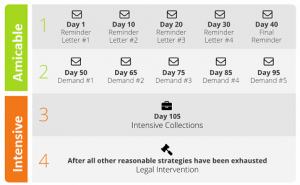
| Are you already using Compulink Medical Software? Have unpaid patient balances aging past 90 days? Need to transfer your overdue accounts receivable to a collection agency? Contact us
|
FAQ
Does AdvantageRCM handle collections on old patient balances?
No. AdvantageRCM handles claim submission, denial follow-up, payment posting, and patient billing, with a strong average collection rate on the claims it manages. It isn’t built to chase seriously delinquent patient balances sitting in 90-plus day aging — that’s a separate function a collection agency is built for.
What’s a healthy days-in-A/R number for a Compulink practice?
Most benchmarks put 30-40 days as a solid target, with anything under 45 days generally acceptable. Once days-in-A/R climbs past that and more than 10% of receivables sit in the 90-plus day bucket, cash flow typically starts to feel the strain.
Can Nexa work directly from a Compulink aging export?
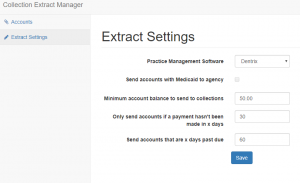
Yes. Nexa takes a Compulink or AdvantageRCM A/R aging export, filtered by whatever placement rules a practice sets — a balance threshold, a days-past-due cutoff, or both — and works the file without requiring manual account-by-account handoff.
Does sending an account to Nexa mean I’m replacing Compulink or AdvantageRCM?
No. Compulink and AdvantageRCM continue handling claims, current billing, and patient records as usual. Nexa only takes over the specific accounts a practice has already decided are past the point of in-house recovery, typically 90-plus days with no payment.
Is Nexa’s process HIPAA compliant for Compulink-based practices?
Yes. All account handling, communication, and data transfer follow HIPAA requirements alongside FDCPA and applicable state collection rules, which matters given the volume of protected health information tied to a Compulink export.