• Skip to main content
  • Skip to primary sidebar

Nexa Collections

  • Home
  • Serving
    • Medical
    • Dental
    • Small Business
    • Large Business
    • Commercial Collections
    • Government
    • Utilities
    • Fitness Clubs
    • Schools
    • Senior Care Facility
  • Contact Us
    • About us
    • Cost

Debt Recovery

NextGen Ambulatory Software & Collections: Turning Reports into Real Cash

NextGen is modern. Your A/R might not be.

NextGen has grown into a major player in ambulatory EHR and practice management, with cloud-based tools for scheduling, documentation, billing, and revenue cycle management for both small practices and larger enterprise groups.

On paper, it can:

  • Streamline claims

  • Reduce days in A/R

  • Accelerate collections

NextGen even offers A/R recovery support, where a specialist team works aged accounts and some clients see several-fold returns on that investment.

Yet many practices still see:

  • Days in A/R drifting well past 40–50 days

  • A growing stack of 60–120+ day patient balances

  • No clear policy on when an account stops being “just late” and becomes bad debt

The problem usually isn’t the software. It’s the last mile of collections.


What NextGen actually does well for the money side

Before talking about collections, it helps to be clear about what NextGen already brings to the table.

For billing & RCM, NextGen can:

  • Capture charges and push cleaner claims through its integrated PM and clearinghouse

  • Use rules engines and edits to reduce denials and rework

  • Provide A/R dashboards and reports so you can see aging, payer mix, and payment lag

  • Offer RCM services teams who focus on insurance A/R, underpayments, and denials

Done well, a practice-management system like NextGen should help you keep most payments inside 30–40 days, with overall A/R days ideally under 40–50.

What it doesn’t do is chase stubborn patient balances indefinitely.


Where NextGen stops and true collections begin

NextGen is built to manage the revenue cycle:

  • Registration

  • Eligibility

  • Coding and charges

  • Claims and remits

  • Insurance follow-up

But once a self-pay or residual balance has:

  • Ignored statements, texts, and portals

  • Sat in 60–120+ day aging buckets

  • Stopped responding to your staff

…you’re no longer dealing with a billing issue. You’re in debt recovery territory.

At this stage, you need:

  • Persistent, structured follow-up over weeks and months

  • Skip-tracing when contact data is wrong

  • Negotiation skills with patients juggling multiple debts

  • A clear path to escalation or closure

That’s work for a collection agency, not an EHR.


A simple NextGen → collection agency workflow

Instead of exporting random spreadsheets whenever someone has time, you can turn your overdue A/R into a repeatable pipeline.

Your existing page already hints at a NextGen debt collection utility. Let’s frame what that looks like in a way that’s clear for readers.

You keep control over four levers:

  1. Minimum balance

    • Example: only send accounts above $100, $250, or $500, depending on your patient base and risk tolerance.

  2. Account age / last payment date

    • Only send accounts where no payment has been made in, say, 60 / 90 / 120 / 180 days.

    • This uses the “last payment” or “last activity” data already living in NextGen.

  3. What “step” they go into

    • Soft, fixed-fee letter campaigns (polite but firm, branded notices).

    • Or straight into phone-driven, contingency collections for chronically late payers.

    • Or a combination: letters first; calls later if there’s still no response.

  4. Who not to send

    • Disputed cases

    • Active payment plans

    • Certain payer classes or assistance programs

    • Any accounts you want to treat with extra care

Once those rules are locked in, the workflow is simple:

  • Run your NextGen aging / A/R reports

  • The utility picks up accounts that meet your rules

  • Approved accounts are transferred cleanly to your chosen collection partner

  • As money is recovered, payments are posted back in your system like any other payment

No re-keying. No “we’ll do this someday.”


When does a NextGen account become a collections account?

Every practice needs its own policy, but your NextGen data should drive that decision, not gut feeling.

A practical approach:

1. Watch your aging buckets

From your NextGen PM or RCM reports, track:

  • 0–30 days (normal cycle)

  • 31–60 days (reminders + phone calls)

  • 61–90 days (warning zone)

  • 91–120+ days (high risk / probable bad debt)

If a noticeable chunk of your patient A/R lives in 91+ days, those dollars are in danger.

2. Set a time rule

For example:

  • Any patient balance with:

    • No payment in 90+ days, and

    • At least 3–4 contacts (statements / reminders / calls), and

    • No active arrangement

    → Eligible for collections placement.

3. Set a dollar rule

  • Very small balances (say, under $50–$100):

    • Bundle them for periodic batch placement or write-off.

  • Mid-size balances (e.g., $150–$750):

    • Full reminder sequence, then collections at 90–120 days.

  • Big balances (e.g., $750+ or $1,000+):

    • Extra attention early; don’t let them quietly age past 60–90 days.

Once you’ve written these rules down, your NextGen reports become a placement engine, not just an FYI.


Why a NextGen-savvy collection agency matters

NextGen already gives you:

  • Detailed A/R and encounter data

  • Insurance vs patient split

  • Notes about earlier contact and billing history

A good collection agency knows how to work with that data instead of starting from scratch. That means:

  • Using your exports to prioritize high-yield accounts

  • Respecting your patient-experience expectations while still being firm

  • Staying compliant with HIPAA, FDCPA, and state collection laws

  • Reporting back with enough detail that you can reconcile easily inside NextGen

You’re not looking for “sharks.” You’re looking for a specialized extension of your revenue cycle that understands how NextGen practices operate.


Where Nexa fits in 

A quick reminder, because it’s easy to get confused:

  • Nexa is an information portal, not a collection agency.

  • We do not call your patients, post payments, or do credit reporting.

Here’s what we actually do:

  • Talk with medical practices using platforms like NextGen about their A/R headaches, balance sizes, and payer mix.

  • Help clarify when it makes sense to keep accounts in your own NextGen workflows and when it’s time to escalate.

  • Share your collection requirements with a shortlist of medical-focused, compliant collection agencies we believe can handle your type of receivables.

  • Leave the choice completely in your hands — you decide which, if any, agency to work with.

If your NextGen dashboards look sophisticated but your aging report is still bloated, it’s not a sign you picked the wrong software.

It’s a sign you’re ready for a sharper, rules-driven bridge between NextGen and true debt recovery — so more of that “Accounts Receivable” line finally turns into cash in the bank.

Already using NextGen Dental Software? Have unpaid medical bills? 


Need to transfer your overdue accounts receivable to a collection agency? Contact us

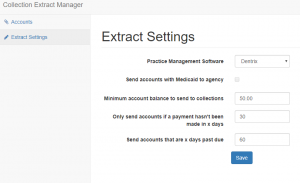
  • You decide what should be the minimum outstanding balance eligible for collections.
  • Only send accounts if a payment hasn’t been made in _(60/120/180) days.
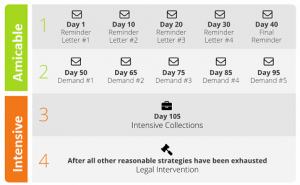
  • Send 5 collection demands to your patient or transfer directly for debt collection calls.
  • You are in total control of the process. Dedicated small business debt collectors.
  • Contact us for a demo of our free NextGen debt collection utility. 

    Collection Agency
    Debt Collection Utility


Filed Under: Debt Recovery

Eaglesoft Integration: Turn Stale Dental A/R into Collected Cash

Eaglesoft is popular. Old A/R is, unfortunately, even more popular.

Eaglesoft has been around for 25+ years and serves nearly 30,000 active users across the U.S. and Canada. It’s a serious platform, not a hobby product.

Yet typical dental A/R tells a different story:

  • Benchmarks often show the average dental practice with tens of thousands of dollars sitting in 90+ day A/R, and once balances cross 90 days, practices usually recover only a small fraction of that money.

  • Many offices see A/R days around 45, even though insurers often pay in roughly 30 days.

In other words: Eaglesoft can be rock-solid and you can still be leaking cash.

This page is about that gap — and how to use both Eaglesoft and a collection agency (via a small, free utility) to close it.


What “healthy” A/R actually looks like for a dental office

Before talking integrations, it helps to know what you’re aiming for.

Dental advisors commonly recommend:

  • A/R days: roughly 30–45 days. Anything consistently above that suggests slow collections or broken workflows.

  • A/R over 90 days: under 10% of total A/R (excluding long ortho contracts).

  • Net collections: around 98–100% of adjusted production.

  • A/R ratio (A/R ÷ average monthly production): ideally close to 1.0–1.5 months of production on the books, not 2–3 months.

Reality check for Eaglesoft users:

If your Eaglesoft A/R report shows A/R days >45, more than 10% of A/R in 90+ days, or an A/R ratio well above 1.5, you’re outside the comfort zone. Those aren’t “slow payers” — that’s bad debt in slow motion.


Eaglesoft does the early work. Late A/R is a different game.

Eaglesoft is built to manage your everyday operations:

  • Scheduling, charting, imaging

  • Insurance claims and e-attachments

  • Statements and online payments (via integrated partners like Vyne Trellis, DentalXChange, CarePay+, card-on-file tools, etc.)

  • A/R and production reports by provider, location, and date

That’s a powerful early-stage revenue engine.

But Eaglesoft will never:

  • Chase a non-responsive patient every week for six months

  • Dig up a new address or phone number

  • Negotiate a multi-step payment plan with someone already behind on other bills

  • Decide which accounts are worth escalating and which should be written off

That’s the line where “practice management” ends and “debt collection” begins.


Step one: find your “collection zone” inside Eaglesoft

Instead of going by gut feeling (“she’s nice, give her more time”), let your Eaglesoft reports tell you when an account has crossed the line.

Start with the A/R Aging report:

  • Look at the breakdown: 0–30, 31–60, 61–90, 91–120, 120+ days.

  • Focus on patient balances, not just insurance A/R.

Ask:

  • What percentage of my A/R is in 90+ days?

  • How much of that is patient responsibility?

  • How long has it been since any payment or meaningful contact?

Remember: once a balance hits 90+ days, your recovery odds drop sharply. Waiting another three months rarely helps.


The free Eaglesoft collection utility: a small tool with sharp teeth

To turn “we should send these to collections” into something automatic, you can use a small, free Eaglesoft debt collection utility.

You stay in control; the utility just enforces your rules.

You can typically set:

  • Minimum balance to send

    • Example: only send accounts over $100, $250, or $500.

  • Age of the account

    • Based on days since last payment or last activity — for example, 60, 90, 120 or 180 days.

  • Which recovery step to use

    • Gentle, fixed-fee letter campaigns first,

    • or direct to full contingency collections for serious delinquents.

  • Which patients to exclude

    • Ortho on long payment plans

    • Genuine hardship or charity-care cases

    • VIPs you want to handle personally

Once the criteria are saved, the utility:

  1. Reads the Eaglesoft database.

  2. Finds accounts matching your rules.

  3. Prepares a clean export for your collection partner (no retyping from screens).

You go from “someday we’ll clean this up” to “once a month, our 90+ day list is automatically prepped for collections.”


Practical placement rules (feel free to modify)

Here are sample rules a typical Eaglesoft practice might adopt:

1. Standard rule for everyday accounts

  • Balance ≥ $200

  • No payment in 90+ days

  • At least 3 statements / reminders already sent
    → Send to fixed-fee letter service or step-2 style demand program.

2. High-balance rule

  • Balance ≥ $750 or $1,000

  • No payment in 60+ days

  • Not in ortho or active payment plan
    → Move faster: short internal follow-up, then straight to contingency collections.

3. Low-balance batch rule

  • Balance $50–$200

  • No payment in 120+ days
    → Either batch these to collections once or twice a year or write off; don’t let tiny balances chew up staff time.

If you can shrink 90+ A/R from something like $100,000 down to $25–30k over time by tightening collections, that’s tens of thousands of dollars back in the bank, not abandoned on old ledgers.


How this plays with the Eaglesoft ecosystem you already use

You don’t have to choose between Eaglesoft integrations and collections. They’re different layers.

  • Claims and e-attachment partners

    • Help you send cleaner claims, get ERAs faster, and reduce payer delays.

  • Payment and text-to-pay tools

    • Make it easier for patients to pay via text, mobile, online, and card-on-file.

Those tools are about preventing A/R from aging in the first place.

The Eaglesoft collection utility + a third-party collection agency are about what to do when, despite all that, money still isn’t coming in.

Think of it as:

Eaglesoft + payment integrations = early-stage collections.
Eaglesoft + our utility + a collection agency = late-stage collections.

You need both layers for a truly healthy A/R.


Where Nexa fits in 

A quick clarification, because it matters:

  • Nexa is an information portal, not a collection agency.

  • We do not call your patients, and we do not do any credit reporting.

What we do:

  • Help Eaglesoft practices think through placement rules and thresholds so they’re using data, not guesswork.

  • Provide access to a free Eaglesoft collection utility that makes it easy to pull and send the right accounts.

  • Share your collection requirements with a short list of dental-savvy, compliant collection agencies we believe fit your profile.

  • Leave the final decision — who you use, when you start, which accounts you place — entirely up to you.

If your Eaglesoft reports show A/R days in the 40s or 50s and a 90+ column that never seems to shrink, it’s not a reason to abandon Eaglesoft.

It’s a signal to:

  1. Tighten your early A/R with the integrations you already have, and

  2. Add a clean, rules-driven pipeline from Eaglesoft → utility → collection agency.

That’s how you turn “we’ll get to it someday” receivables into money that actually hits your bank account.


Already using Eaglesoft Dental Software? Have unpaid medical bills? 


Need to transfer your overdue accounts receivable to a debt collection agency? Contact us

  • You decide what should be the minimum outstanding balance eligible for collections.
  • Only send accounts if a payment hasn’t been made in _(60/120/180) days.
  • Send 5 collection demands to your patient or transfer directly for debt collection calls.
  • You are in total control of the process. Dedicated small business debt collectors.
  • Contact us for a demo of our free Eaglesoft debt collection utility. 

    Collection Agency
    Debt Collection Utility


Filed Under: Debt Recovery

Using Nextech Software? Need Debt Collection Agency?

If you are a doctor or practice administrator you know that the software you use is of vital importance to the success of your practice, both in terms of patient care and its financial success.

A great practice management software will help your practice run more smoothly, get through your appointments faster, and help your medical professionals see the information they need at-a-glance.

You need to find a package that fits your changing needs, is suitable for both the medical providers and the front and back-office staff. If you are a specialist practice your software solution is even more vital. For over two decades Nextech have produced an advanced and integrated EMR and PM solution, but is it the right one for your business?

Already using Nextech Software? Have unpaid medical bills? 
Need to transfer your overdue accounts receivable to a debt collection agency? Contact us

  • You decide what should be the minimum outstanding balance eligible for collections.
  • Only send accounts if a payment hasn’t been made in _(60/120/180) days.
  • Send 5 collection demands to your patient or transfer directly for debt collection calls.
  • You are in total control of the process. Dedicated small business debt collectors.
  • Contact us for a demo of our free Nextech debt collection utility. 

    Collection Agency
    Debt Collection Utility

Who is Nextech EMR for?

Nextech’s Practice Management software is designed specifically for practices that specialize in areas like ophthalmology, plastic surgery, dermatology, orthopedics and medical spas.

What are the Benefits of Using Nextech EMR?

The key benefit of using Nextech EMR for your specialist practice is that it is highly customizable, so you can customize templates and more to fit the needs of your practice and desired workflow. Some of the other key benefits are:

  • Speedy Charting – charting is often a time-consuming process, but Nextech can be tailored instantaneously to a physician’s needs without the need to talk to a developer. These custom templates allow you to take accurate, relevant notes and do diagnosis coding via dropdown menus and filtered lists.
  • Streamlined Laboratory Communication – the time it takes to order tests and wait for results is stressful for clients and frustrating for physicians, but the software tracks the progress, reduces paperwork, and reduces the amount of time before a doctor can give a diagnosis.
  • Streamlined Scheduling – The scheduling module allows maximum efficiency whilst dealing with numerous medical providers at different locations, easy drag and drop appointment changes, and a first available appointment finder.
  • Appointment Reminder and Automatic Schedule Updates – Within the scheduler, there is an integrated secure reminder system that automatically messages patients’ cell phones and, when they text back either confirming or canceling, the scheduler automatically updates to reflect their answer.
  • Real-Time Practice Management – The room manager allows both providers and administrators to see in real-time how patients are progressing during their visits. This allows identification of problem areas so the correct choices can be made to ease the patient’s path and thus helps to improve patient care.
  • Optimized Billing – Your billing will be simplified and profitability increased by Nextech’s intuitive ICD-10 coding assisted solution which decreases denials and maximizes reimbursements. Your payment turn-around will be accelerated and the workflow of your back office optimized. There is a comprehensive claims management system that simplifies this often complex and troublesome area.
  • Cloud-Based – It is a web-based, multi-platform system where providers can study patient profiles, check appointments and view all data on their cell phones and tablets. The interface is very simple to use allowing physicians to flip through documents as if they were paper. It also enables individual charting and maximizes charting efficiency keeping all data accessible and complete.
  • Patient Portal – There is an option within the software to provide a patient portal so that patients can update their information, look at three test results and check on appointments.
  • Strong Support – One of the most important aspects of any software is its support. Nextech provides both on the phone and in-person support are ready to address your problems and find solutions. They want happy, successful customers who will be happy with their system and recommend it to other practices in their field.

What are Nextech EMR’s Features?

  • Custom Templates and Fields
  • Drag and Drop Scheduling
  • High-Powered Analytics Tools
  • Patient Portal
  • Multi-Platform
  • Cloud-Based
  • Nextech Network Easy Referrals
  • Shared Clinical Knowledge Library
  • Dictation Tools
  • E-Prescribing
  • HIPAA Compliant

Is Nextech Right For You?

The software is constantly being updated and refined to keep your practice performing at its best, and while no practice management software is faultless, Nextech is constantly fine-tuning their product to remove any bugs, improve performance and take on board customers’ feedback.

At the moment Nextech is used worldwide by 7,000 medical providers and over 50,000 support office staff. You don’t get that kind of success without providing a Practice Management system that works well, runs smoothly and allows medical providers to concentrate on helping their patients, so it’s highly likely it will be the right software for your practice.

Nextech doesn’t offer a free trial and the only way to get a quote is to contact them, so if you think Nextech is right for your practice, contact them for a demo.

Filed Under: Debt Recovery

eClinicalWorks & Medical Collections: Turning Your A/R Dashboard Into Real Cash

If you’re running your practice on eClinicalWorks and still watching A/R creep past 45–60 days, the problem isn’t just “slow payers.” It’s that you’re using a powerful EHR and RCM platform without a clear, disciplined collections strategy around it.


eClinicalWorks is strong EHR software. It’s not a collections department.

eClinicalWorks has grown into one of the largest ambulatory EHR and PM platforms in the U.S. Tens of thousands of providers rely on it every day for:

  • Scheduling and clinical documentation

  • E-prescribing, labs, and imaging

  • Charge capture and coding

  • Claims, posting, and reporting

Many practices also use eCW RCM tools and services for:

  • Eligibility and deductible checks

  • Claim scrubbing and automated edits

  • ERA posting and denial queues

  • Dashboards and KPIs

More recently, eCW has leaned heavily into AI-powered, “agentic” RCM to reduce manual work and speed up claim cycles.

All of that is valuable. But even with great software, most practices still face:

  • A/R days drifting into the 40s and 50s

  • 10–20% of A/R sitting in 90+ day aging

  • Denial rates in double digits, especially as payer rules change

At some point, technology alone cannot force patients or payers to pay. You need clear policies, people, and collection partners around the system.


What eClinicalWorks does well for revenue — and what it doesn’t do

It helps to draw a clean line:

eCW is great at:

  • Capturing charges quickly and consistently

  • Reducing obvious coding and format errors

  • Submitting and tracking claims electronically

  • Highlighting denials and underpayments

  • Producing A/R and aging reports by payer, provider, and location

eCW does not:

  • Call overdue patients and arrange payment plans for you

  • Negotiate with stubborn self-pay accounts that are 120+ days old

  • Skip-trace bad addresses or wrong phone numbers

  • Litigate or pursue hard-to-collect balances

  • Replace a licensed, compliant, third-party collection agency for bad-debt A/R

If you treat eClinicalWorks like a “set it and forget it” collections machine, you end up with a beautiful dashboard and a growing pile of unpaid balances.


Are your eClinicalWorks numbers actually healthy?

The first step is to stop guessing and look at your eCW reports like a CFO, not just a clinician.

Key metrics to pull from eCW:

  • Days in A/R (overall)

    • Strong practices aim for roughly 30–40 days.

    • When you’re consistently over 45–50 days, something is off.

  • A/R aging buckets
    Break out patient and insurance A/R into:

    • 0–30 days

    • 31–60 days

    • 61–90 days

    • 91–120 days

    • 120+ days

    As a rough rule of thumb, A/R over 90 days should be a small slice, not a large chunk. When more than 10–15% of your total A/R lives there, it’s a red flag.

  • Insurance vs patient responsibility
    Look at how much A/R is:

    • Payer balances

    • Pure self-pay

    • Patient-due after insurance

    With high deductibles and co-insurance, patient balances are rising. These require a very different follow-up approach than payer A/R.

  • Denial rate and top denial reasons
    eCW already shows you:

    • Percentage of claims denied on first pass

    • Common denial codes (authorization, eligibility, coding, timely filing)

    If denials are creeping up year over year, your staff is spending more time firefighting, and more balances are drifting into aged A/R.

Once you know your numbers, the question becomes: What happens to those 60-, 90-, and 120-day balances next?


Where balances slip through in eClinicalWorks workflows

Even well-run practices see money slipping through at a few critical points:

  1. Front-office gaps

    • Demographics, insurance information, or eligibility checks are incomplete.

    • Patients are not clearly told how much they will owe or when.

  2. Back-office overload

    • Denial queues in eCW grow faster than staff can work them.

    • Simple, low-dollar claims get ignored in favor of complex ones.

  3. Weak patient follow-up

    • Statements go out, but no structured reminder schedule exists.

    • Staff make calls “when they have time,” which is never enough.

  4. No clear escalation rule

    • Some practices keep accounts forever in “patient A/R” because nobody wants to “send patients to collections.”

    • Result: high A/R, low cash, and a lot of quiet write-offs.

eClinicalWorks shows you the problem clearly on screen. But unless you turn those insights into rules and actions, nothing changes.


Using eClinicalWorks data to decide what goes to collections

A practical approach is to define simple, written placement rules based on your eCW reports. For example:

By aging:

  • Patient balances 0–30 days: statements and soft reminders only.

  • 31–60 days: reminder letter + text/email + phone attempt.

  • 61–90 days: stronger reminder, offer payment plan, final internal notice.

  • 90+ days: if no progress or arrangement, eligible for third-party collections.

By balance size:

  • Small balances (for example, under $50 or $100):

    • One or two reminders, then internal write-off or batch placement depending on your policy.

  • Mid-range balances (for example, $100–$500):

    • Follow full internal workflow, then move to collections at 90+ days.

  • Large balances (for example, $500+ or $1,000+):

    • Earlier calls, more effort at 30–60 days.

    • Do not let them quietly age into 6–12 months.

By payer / visit type:

  • Chronic non-paying payers or plans:

    • Tighten pre-authorization and eligibility rules.

    • Make sure balances from those plans are watched closely.

  • Certain visit types (procedures, high-dollar imaging, elective care):

    • Stricter front-end collections (deposits, signed estimates).

    • Faster escalation path if the patient balance is ignored.

You can set up most of these segments directly inside eCW using existing reports and filters. The missing piece is the policy and follow-through.

Already using eClinicalWorks Software? Have unpaid medical bills? 
Need to transfer your overdue accounts receivable to a debt collection agency? Contact us

  • You decide what should be the minimum outstanding balance eligible for collections.
  • Only send accounts if a payment hasn’t been made in _(60/120/180) days.
  • Send 5 collection demands to your patient or transfer directly for debt collection calls.
  • You are in total control of the process. Dedicated small business debt collectors.
  • Contact us for a demo of our free eClinicalWorks debt collection utility. 

    Collection Agency
    Debt Collection Utility


AI + humans: pairing eCW RCM with real-world collections

eClinicalWorks’ newer AI and automation features are ideal for:

  • Scrubbing claims and catching coding issues

  • Checking status with payers

  • Pushing clean claims out faster

  • Flagging risky accounts before they age out

What AI cannot do on its own:

  • Talk a scared patient through a bill they don’t understand

  • Negotiate a realistic payment plan with someone juggling multiple debts

  • Track down a moved patient with no forwarding address

  • Decide when it’s time to escalate to legal action

That’s where professional medical collection agencies come in. The best ones:

  • Understand HIPAA, FDCPA, and modern medical-debt rules

  • Are comfortable working from eClinicalWorks exports and reports

  • Use patient-friendly scripts and payment options

  • Provide feedback that helps you tweak your eCW workflows upstream

Think of it as a layered system:

  • eClinicalWorks + your staff: prevent as much A/R and denial waste as possible.

  • Collection partners: recover what inevitably slips through, without abusing patients or damaging your reputation.


What a healthcare-focused collection agency should know about eClinicalWorks

If you’re on eCW, look for agencies that can speak your language. They should be ready to:

  • Accept secure exports of aging reports, patient contact data, and balance details from eCW

  • Work with your payer codes, rendering providers, and locations

  • Respect your do-not-contact lists, charity-care policies, and state-specific rules

  • Report back recovery data in a format you can easily map to your eCW metrics

Red flags:

  • Agencies that treat medical debt exactly like credit-card collections

  • No understanding of No Surprises Act, medical-debt credit reporting changes, or balance-billing limits

  • No process for protecting PHI or signing Business Associate Agreements

You want a partner that understands both medical compliance and the reality of patient-pay balances in a high-deductible world, not just a generic call center.


FAQs: eClinicalWorks and medical collections

Does eClinicalWorks include a built-in collection agency?
No. eClinicalWorks offers powerful billing and RCM tools, and in some cases full-service RCM, but it is still software and services—not a contingency collection agency. It will not pursue old patient debts the way a licensed collection firm does.

What A/R days should a practice on eClinicalWorks aim for?
Many practices using eCW aim for 30–40 days in A/R with a relatively small slice of A/R over 90 days. If your dashboards show 45–50+ days consistently, or a large chunk of your A/R sitting 90+ days, that’s a sign your follow-up and collections process needs work.

How do I know which eCW accounts to send to collections?
Use your eClinicalWorks aging reports to define clear rules by age, balance size, and visit type. A common pattern is: once a patient balance is 90+ days old with no response, it is a strong candidate for third-party collections.

Can I still use eClinicalWorks if I outsource collections?
Yes. Most practices continue to use eCW for charge capture, billing, and reporting, while sending specific sets of aged accounts to an external agency. The data starts and ends in your EHR/PM system; the collection agency simply works that data in between.

Will using a collection agency upset my patients?
Handled poorly, it can. Handled well, it doesn’t have to. A good medical-focused agency uses respectful language, offers payment plans, and knows when to back off. Often, patients have already ignored multiple statements and calls before an account is ever placed.


How Nexa helps eClinicalWorks practices strengthen collections

If your eClinicalWorks reports look impressive but your bank balance doesn’t, it’s time to rethink the collections layer around your EHR.

Nexa is an information portal that helps businesses and medical practices, including those on eClinicalWorks, find suitable collection agencies.

  • We are not a collection agency ourselves and we do not perform credit reporting.

  • Instead, we learn about your specialty, A/R profile, and compliance needs.

  • Then we share your collection requirements with carefully shortlisted medical-focused agencies that we believe can perform well for your kind of A/R.

  • It is entirely up to you whether or not to use their services.

If your eClinicalWorks dashboards show rising A/R and stubborn patient balances, share a few details about your situation. You keep focusing on clinical care and clean data; we’ll help you explore options to turn more of that A/R into collected, predictable cash.

Filed Under: Debt Recovery

Using CareCloud Software? Need a Collections Agency to Recover Bills?

Tired of a beautiful CareCloud dashboard and an ugly aging report?
You’re not alone. Many practices get the front end right—claims go out, payments come in—yet a stubborn pile of old patient balances never really moves.

Why CareCloud users still struggle with A/R

CareCloud checks a lot of boxes:

  • Cloud-based EHR and practice management

  • Integrated RCM tools or full billing services

  • Dashboards that show denials, collections, A/R trends

On paper, everything looks under control.

But in real life you still see:

  • Accounts that sit 60, 90, 120+ days past due

  • A growing chunk of A/R tied to patient responsibility

  • Staff who “will follow up later” but never quite get to it

That’s not a software bug. That’s the gap between billing and debt recovery.


Where CareCloud helps you – and where it stops

CareCloud is very good at what it is supposed to do:

  • Capture charges and create claims

  • Scrub and submit those claims accurately

  • Post payments and adjustments

  • Generate aging and KPI reports

  • Send standard statements and reminders

What it does not do:

  • Call a patient every week for two months

  • Track down a guarantor who moved and changed numbers

  • Negotiate a realistic payment plan when a family is already behind on other bills

  • Decide which accounts should move from “late” to “collections”

If your strategy is “we’ll keep sending statements and hope something happens,” your old A/R will keep growing—no matter how polished the software is.


The “red zone”: when an invoice stops being a bill and becomes bad debt

Every practice has a point where, if you’re honest, you know:

“If this hasn’t been paid by now, it probably won’t be… unless someone treats it like a collections problem.”

A few simple signals:

  • Age: The balance has been sitting for three to four months with no meaningful payment.

  • Silence: Statements went out, maybe a couple of calls… and then nothing.

  • Behavior: The patient stopped responding, keeps cancelling, or ignores every message.

CareCloud will happily show you these accounts in your A/R Aging report. It will not make the hard decision for you.

You need a line in the sand that says:

“After this point, this stops living in our billing workflow and moves to our collection workflow.”


Turn your CareCloud A/R into a simple rulebook

Instead of debating every account, build a small rulebook that lives on top of your CareCloud data.

Here’s one way to structure it:

Rule 1: Time

  • If a patient balance has no payment in 90+ days, and

  • You’ve already made at least 3 contact attempts (statement, portal reminder, or phone call),

→ it is eligible for collections.

Rule 2: Amount

  • Very small balances (for example under $50–$100):

    • Either batch them once or twice a year, or make a decision to write them off.

  • Mid-sized balances (for example $150–$750):

    • Follow your normal reminder workflow; if still unpaid at 90–120 days, move them to collections.

  • Larger balances (for example $1,000+):

    • Review earlier and escalate faster if there is no payment or plan by 60–90 days.

Rule 3: Exceptions

  • Keep out:

    • Formal payment plans that are being honored

    • Active disputes

    • Approved charity-care or special-case patients

Once this is written down, CareCloud becomes a trigger engine, not just a reporting tool.


How a CareCloud-friendly collections workflow fits in

Now you need a way to turn those rules into an actual, repeatable process.

That’s where a CareCloud-friendly debt-collection utility comes in. The goal is to make the handoff from CareCloud → collection agency:

  • Easy to configure

  • Boring to run

  • Hard to forget

Typical knobs you control:

  • Minimum balance:
    “Only send accounts with balances over $200 or $300.”

  • Account age:
    “Only send accounts where there’s been no payment for 90 days (or 60 / 120 / 180—your choice).”

  • Recovery path:

    • Start with a fixed-fee letter series (firm but courteous demand letters), or

    • Go straight to contingency collections for the worst accounts.

  • Exclusions:

    • Remove accounts in payment plans, flagged disputes, or any category you mark as “do not place.”

Once configured, the utility:

  1. Reads the A/R data from CareCloud.

  2. Finds accounts that match your rules.

  3. Prepares a clean, secure file for your collection partner.

You’re no longer “remembering to send accounts to collections”. It just happens on schedule.


Three simple playbooks (you can adjust the numbers)

You don’t have to reinvent anything. Start with patterns like these and tweak them to your comfort level.

Playbook 1 – Standard patient A/R

  • Balance ≥ $200

  • No payment in 90+ days

  • At least 3 contacts recorded

→ Send to a fixed-fee letter program first. If no response after that series, escalate to contingency collections.


Playbook 2 – High-balance safeguard

  • Balance ≥ $1,000

  • No payment or arrangement at 60 days

→ Manager review + one last internal call.
If still no plan by 90 days, move to a full collections placement.


Playbook 3 – Old A/R cleanup
Once a month, run a report of all patient A/R over 120 days that isn’t in a payment plan or dispute.

  • Decide whether to:

    • Place them in bulk with your collection agency, or

    • Close / write off accounts that truly have no recovery path

Either way, you stop letting “forever balances” clutter your CareCloud reports.


“Won’t using a collection agency upset our patients?”

It depends on who you choose and what you ask them to do.

A good healthcare-focused collection agency will:

  • Work under HIPAA and other privacy rules, sharing only the minimum needed information

  • Follow debt-collection regulations and your own communication preferences

  • Approach patients with a firm but respectful tone

  • Offer realistic payment options instead of “pay in full or else” ultimatums

Your team stays focused on care and early financial conversations.
The agency focuses on late-stage accounts that have already been given reasonable chances.


Where Nexa fits in (and what we don’t do)

Quick clarification:

  • Nexa is an information portal.

  • We are not a collection agency.

  • We do not call your patients or report to credit bureaus.

What we do:

  • Talk with practices that use platforms like CareCloud and dig into their A/R challenges, typical balances and patient mix.

  • Help you think through placement rules that sit on top of your existing CareCloud reports.

  • Share your collection requirements with a shortlist of medical collection agencies we believe are a good match for your type of receivables.

  • Leave it completely up to you whether to work with any of them.

CareCloud already gives you cleaner claims, better reporting, and a clearer view of your revenue.

Layer a simple, rule-based collections process on top, and those stubborn 60–120+ day balances stop being long-term residents in your aging report—and start becoming cash you can actually use.

Already using CareCloud Software? Have unpaid medical bills? 

Need to transfer your overdue accounts receivable to a collection agency? Contact us

  • You decide what should be the minimum outstanding balance eligible for collections.
  • Only send accounts if a payment hasn’t been made in _(60/120/180) days.
  • Send 5 collection demands to your patient or transfer directly for debt collection calls.
  • You are in total control of the process. Dedicated small business debt collectors.
  • Contact us for a demo of our free CareCloud debt collection utility. 

    Collection Agency
    Debt Collection Utility


Filed Under: Debt Recovery

QuickBooks Online & Collections: What To Do When Customers Still Don’t Pay

QuickBooks Online is doing its job. Are your customers doing theirs?

Open your QuickBooks Online A/R Aging Summary right now and ask yourself three questions:

  • How much is sitting over 30 days past due?

  • How much is stuck at 60–90+ days?

  • If that money was in your bank account today, would your stress level drop?

QuickBooks’ own research says over half of small businesses are owed money, with an average of about $17,500 in unpaid invoices, and US businesses together are sitting on hundreds of billions of dollars in A/R.

Most of those businesses already use QuickBooks.

So the problem isn’t just “we need better software.”
The problem is what happens after you send the invoice.


What QuickBooks Online gets right about A/R

QuickBooks Online actually gives you a solid collections toolkit—if you turn it on and use it consistently.

Invoice & A/R basics

  • Create clean invoices quickly

  • Track who owes what, and for how long

  • Run A/R Aging Summary / Detail by customer, date range, and balance

Built-in “early collections” tools

  • Automatic reminders: schedule polite nudges before and after due dates

  • Automatic late fees: apply a fee to overdue invoices based on your rules

  • “Pay Now” buttons: let customers pay online via card or bank transfer

  • Recurring invoices & autopay: ideal for retainers and subscriptions

If you only send an invoice and hope for the best, you’re using maybe 30% of what QuickBooks can do for collections.

Already using Quickbooks? Have unpaid bills?

Need to transfer your unpaid accounts to a collection agency?
Contact us

We will show you how easily you can submit accounts for collections using a simple online form.

  • No minimum balance requirements.
  • Only send accounts if a payment hasn’t been made in _(60/120/180/365) days.
  • Send five collection demands to your defaulter or transfer directly for debt collection calls.
  • You are in total control of the process. You get a dedicated team of small business debt collectors.
  • Contact us for a demo of all our debt collection services. 

    Collection Agency
    Debt Collection Utility


Do this inside QuickBooks before you ever call a collection agency

Think of it as your QBO Collections Setup:

1. Turn on automated invoice reminders
Stop relying on “I’ll remember to email them.”
Set up 2–3 reminders around the due date, for example:

  • 7 days before due

  • On the due date

  • 7–10 days after due

Once you configure it once, QuickBooks keeps nudging them for you.


2. Enable online payments on every invoice you reasonably can

If customers have to:

  • Find their checkbook

  • Print the invoice

  • Drive to the bank

…you’ve already lost momentum.

Let them click “Pay now”, choose card or bank transfer, and be done in 30 seconds.


3. Decide where you’ll charge late fees – and stick with it

You don’t have to hit every client with a fee. But for chronic late-payers, auto late fees:

  • Signal that you’re serious about due dates

  • Compensate (a little) for the extra hassle

Set it once. Let QuickBooks add it automatically.


4. Make A/R aging a weekly habit, not a quarterly surprise

Every week, run:

  • A/R Aging Summary

  • Filter by 61–90 and 90+ days

  • Tag these as “risk” customers in your notes or custom fields

These are the accounts that are quietly turning into bad debt.


When a QuickBooks invoice becomes a collections problem

At some point, reminders, late fees, and “Pay now” buttons stop working. That’s your line in the sand.

Common rules small businesses adopt:

  • Time-based rule

    • If an invoice is 60–90 days past due and the customer isn’t responding or keeps breaking promises, it’s a collection candidate.

  • Amount-based rule

    • Very small balances (say, under $50–$100):

      • One or two reminders, then you decide: batch them to an agency or write them off.

    • Larger balances (hundreds or thousands):

      • Get a phone call, maybe one last email, then escalate sooner rather than later.

  • Behavior-based rule

    • Bounced checks, “the check is in the mail” for months, or complete ghosting after multiple reminders are all signs that more software nudges won’t change the outcome.

Once an account hits your thresholds, you stop treating it like a “normal” QuickBooks invoice and start treating it like what it really is: a recovery project.


What a collection agency does that QuickBooks never will

QuickBooks is superb at tracking and nudging.
Collection agencies exist for the people who ignore all of that.

A good agency can:

  • Call, email, and text over a long period with a consistent strategy

  • Talk through payment plans, settlements, and partial payments

  • Use skip-tracing to find moved or hiding debtors

  • Escalate a minority of cases toward legal remedies when appropriate

  • Work directly from your QuickBooks exports (aging reports, customer info, invoices)

QuickBooks tells you who owes you money.
A collection agency focuses on how to actually get it back.

You need both.


QuickBooks Online + Nexa: layering real collections on top of your A/R

If your A/R Aging report in QuickBooks Online shows:

  • Too many invoices over 60–90 days, and

  • A growing pile of “we’ll pay soon” customers

…your problem is no longer a reporting issue. It’s a collections issue.

That’s where Nexa comes in.

Nexa is an information portal that helps businesses using tools like QuickBooks Online find suitable collection agencies:

  • Nexa is not a collection agency.

  • We do not perform any credit reporting.

  • You tell us about your business, invoice sizes, and A/R headaches.

  • We share those collection requirements with carefully shortlisted agencies that we believe can handle your type of debt in a professional, compliant way.

  • It is completely your decision whether or not to use their services.

You’ve already invested in QuickBooks Online.
Make it do its part: reminders, fees, payment links, clean reports.

Then, for the invoices that still don’t move, add the one layer QBO doesn’t have:
a focused, third-party collection partner who treats your receivables like money, not just numbers on a screen.

Filed Under: Debt Recovery

  • « Go to Previous Page
  • Page 1
  • Interim pages omitted …
  • Page 24
  • Page 25
  • Page 26
  • Page 27
  • Page 28
  • Interim pages omitted …
  • Page 50
  • Go to Next Page »

Primary Sidebar


accounts receivable

Need a Collection Agency?
Kindly fill this form.
We’ll get in touch with you

    Please prove you are human by selecting the house.

    Recent Posts

    • Federal Government Shutdown: Impact on Collections
    • 2025-2026 ROI & Opportunity Matrix for Collection Agencies
    • Timeshare Debt Recovery | Maintenance Fee Collections
    • When Should I Send Dental Accounts to Collections? A Guide for a Healthy Practice
    • 10 Signs You Need to Hire a Medical Debt Collection Agency
    • Debt Collection for Telehealth Providers: Proven Strategies & Best Practices
    • The Rise of Mobile Payment Solutions in Debt Collection
    • Why Cybersecurity Matters for Collection Agencies

    Featured Posts

    • How to Prevent your Business from Losing Customers
    • 10 Signs You Need to Hire a Medical Debt Collection Agency
    • School Lunch Debt Recovery | The Ethical, No-Shaming Solution

    Copyright © 2026 NEXACOLLECT.COM | All information on this website is for general information only and is not an experts advice. We do not own any responsibility for correctness or authenticity of the information, or any loss or injury resulting from it.

    X
    Need a Collection Agency?
    Contact Us