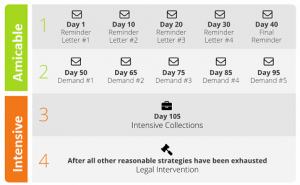
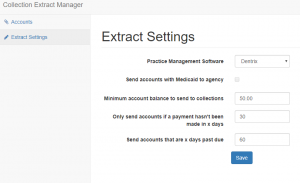
Compulink keeps your clinic busy. But is it keeping your A/R clean?
Compulink Advantage is pitched as an all-in-one platform – EHR, practice management, and revenue cycle management for specialties like ophthalmology, optometry, dermatology, podiatry, behavioral health, and more.
On top of the software, their AdvantageRCM service promises to “handle everything associated with billing your claims,” including claim scrubbing, payer follow-up, posting, and patient billing – with an average collection rate around 98% for the claims they manage.
That’s impressive.
But if you log into Compulink and see:
-
Days in A/R creeping past 40–50 days
-
A big chunk of balances sitting in 90+ day aging
-
Patient A/R growing faster than your staff can chase it
…then you’ve hit the limit of what software + RCM can do on their own. That’s where a true collections strategy has to kick in.
Quick reality check: what “healthy” A/R should look like
Most financial benchmarks for medical practices cluster around a few key numbers:
-
Days in A/R (DAR / DSO)
-
Many sources put 30–40 days as a solid target.
-
Keeping DAR under 45 days is generally seen as acceptable; beyond that, cash flow starts to feel tight.
-
-
A/R over 90 days
-
Best practice: keep less than 10% of total A/R in the 90+ bucket.
-
Once a balance passes 90 days, the odds of full recovery drop sharply.
-
If your Compulink reports show:
-
Days in A/R >45, and/or
-
More than 10% of receivables over 90 days
…you’re not just “a bit behind.” You’re sitting in the danger zone where many practices quietly write off money they’ve already earned.
What Compulink actually handles well in the revenue cycle
To be fair, Compulink does a lot of heavy lifting already:
-
EHR + practice management to streamline encounters, documentation, and scheduling.
-
Integrated RCM (AdvantageRCM) for professional billing services:
-
Claim scrubbing and submission
-
Payer follow-up and denial work
-
Payment posting
-
Patient billing and statements
-
-
Specialty-focused workflows (smart templates, niche documentation, etc.) that keep charge capture aligned with clinical reality.
Used properly, that stack should:
-
Boost your clean-claim rate
-
Reduce avoidable denials
-
Keep most payments in the 30–40 day window
What it does not do is chase down seriously delinquent patient balances for months or years, or decide which accounts are worth sending to a collection agency.
Where money still leaks out (even with AdvantageRCM)
Even with a strong system and an outsourced RCM team, there are predictable “leak points”:
-
High-deductible and self-pay balances
-
Insurance might pay on time, but the patient portion lingers.
-
-
Denials that are technically fixable, but practically ignored
-
The billing team is overloaded; some claims age out instead of being appealed.
-
-
Patients who go dark
-
Email and portal messages bounce or are ignored; phone numbers change; addresses are stale.
-
-
No hard “stop line”
-
Statements keep going out, but there’s no clear rule for when an account leaves Compulink/RCM and goes to third-party collections.
-
By the time a balance sits in 90–120+ day A/R, your odds of full recovery are far lower.
That’s exactly the range where a collection agency is built to operate.
Turning Compulink reports into a collections pipeline
Instead of debating every old account in staff meetings, use Compulink’s data to make automatic, boring, consistent decisions.
Think in three steps:
1. Use Compulink to segment your A/R
From your Compulink Advantage or reporting module, regularly pull:
-
A/R by aging bucket (0–30, 31–60, 61–90, 91–120, 120+)
-
Separate insurance A/R vs patient A/R
-
Optional: by location, provider, or specialty line (e.g., retina vs routine eye exams, med vs surg, etc.)
This isn’t just for a pretty dashboard. These buckets become rules.
2. Decide when a Compulink account stops being “ours”
Write simple, hard triggers like:
-
Time rule
-
Any patient balance with no payment in 90+ days
-
Plus 3–4 documented contacts (statements, reminders, calls)
→ Eligible for external collections.
-
-
Dollar rule
-
Very small balances (<$50–$100): either batch them for infrequent placement or write them off.
-
Mid-range balances (say $150–$750): placed at 90–120 days if unresponsive.
-
Larger cases ($750+ or $1,000+): get closer attention early and don’t sit beyond 60–90 days without a plan.
-
-
Exception rule
-
Disputed cases, formal charity-care, or certain program patients can follow a different internal path.
-
Once this is on paper, your staff is no longer arguing case by case — they’re following policy driven by Compulink data.
3. Make the handoff simple
Whether you export via:
-
A scheduled A/R aging export from Compulink
-
A custom report filtered by your placement criteria
-
A small in-house utility that formats files for your agency
…the key is that once a month (or once a week for large groups), your “collections file” is pulled and securely transferred to your chosen collection partner. No manual cherry-picking.
Recovered payments come back and are posted in Compulink like any other payment, keeping your books and your dashboards accurate.
Sample policy you can adapt for Compulink users
Here’s a compact, “steal-this” version you can tweak:
-
Send to collections when ALL of these are true:
-
Patient balance ≥ $200
-
No payment in 90+ days
-
At least 3 touches (statement, portal message, or phone attempt)
-
No active payment plan, no open dispute
-
-
High-balance exception:
-
If balance is ≥ $1,000, escalate review at 60 days; if still no payment or arrangement by 90 days, move to collections.
-
-
Low-balance sweep:
-
Once or twice a year, run a Compulink report for balances $50–$200 with 120+ days aging and either:
-
Place them in one batch with your agency, or
-
Write them off and clean the ledger
-
-
Tie this to the benchmarks: if your A/R over 90 days drops under ~10% and your days in A/R move toward the 30–40 day range, you’ll see the difference in your bank balance long before the next Compulink feature release.
Why a Compulink-savvy collection partner matters
Compulink is heavily used in specialty practices (ophthalmology, optometry, dermatology, podiatry, behavioral health, pain, PT, etc.).
A good collection agency for Compulink users should:
-
Understand specialty billing patterns (global periods, bundles, high-ticket procedures, recurring visits).
-
Work from your Compulink exports without constant hand-holding.
-
Respect your need for good patient relationships – especially in long-term specialty care.
-
Stay fully compliant with HIPAA, FDCPA, and state collection rules.
You’re not looking to replace Compulink. You’re looking to finish the job Compulink starts by adding a focused recovery layer for the oldest accounts.
Where Nexa fits into the Compulink picture
A quick clarification:
-
Nexa is an information portal, not a collection agency.
-
We do not call your patients, submit claims, or do credit reporting.
What we do:
-
Talk with Compulink-based practices about their A/R numbers, patient mix, and pain points.
-
Help you think through when to keep accounts inside your Compulink / AdvantageRCM workflows and when to send them out.
-
Share your collection requirements with a shortlist of medical-focused, compliant collection agencies we believe can handle your type of receivables.
-
Leave the choice — which agency, which accounts, when to start — entirely up to you.
If Compulink is doing its job but your aging report still makes you wince, you don’t need a new EHR.
You need a clear, Compulink-driven bridge from “overdue” to “paid” — so fewer of your charges die in the 90-day column and more of them show up where they belong: in your bank account.
| Are you already using Compulink Dental Software? Have unpaid medical bills? Need to transfer your overdue accounts receivable to a collection agency? Contact us
|